One app.
The whole working day.
Prozence is made of twenty-four modules. They all use the same employee and customer records, and you switch on only the ones you need. Under each module, the "Fine details" section lists the time limits, defaults, options and things to know, one by one.
People and companies in the screenshots are fictional. Most screens are shown in Turkish.
Every card you share,
current and in your brand.
Each employee gets a business card page on your company's own domain. Whoever opens it can call, email or save the contact with one tap. Cards come from the directory and are managed from one screen; a detail changes once and updates on the card, in the signature and in the wallet together.

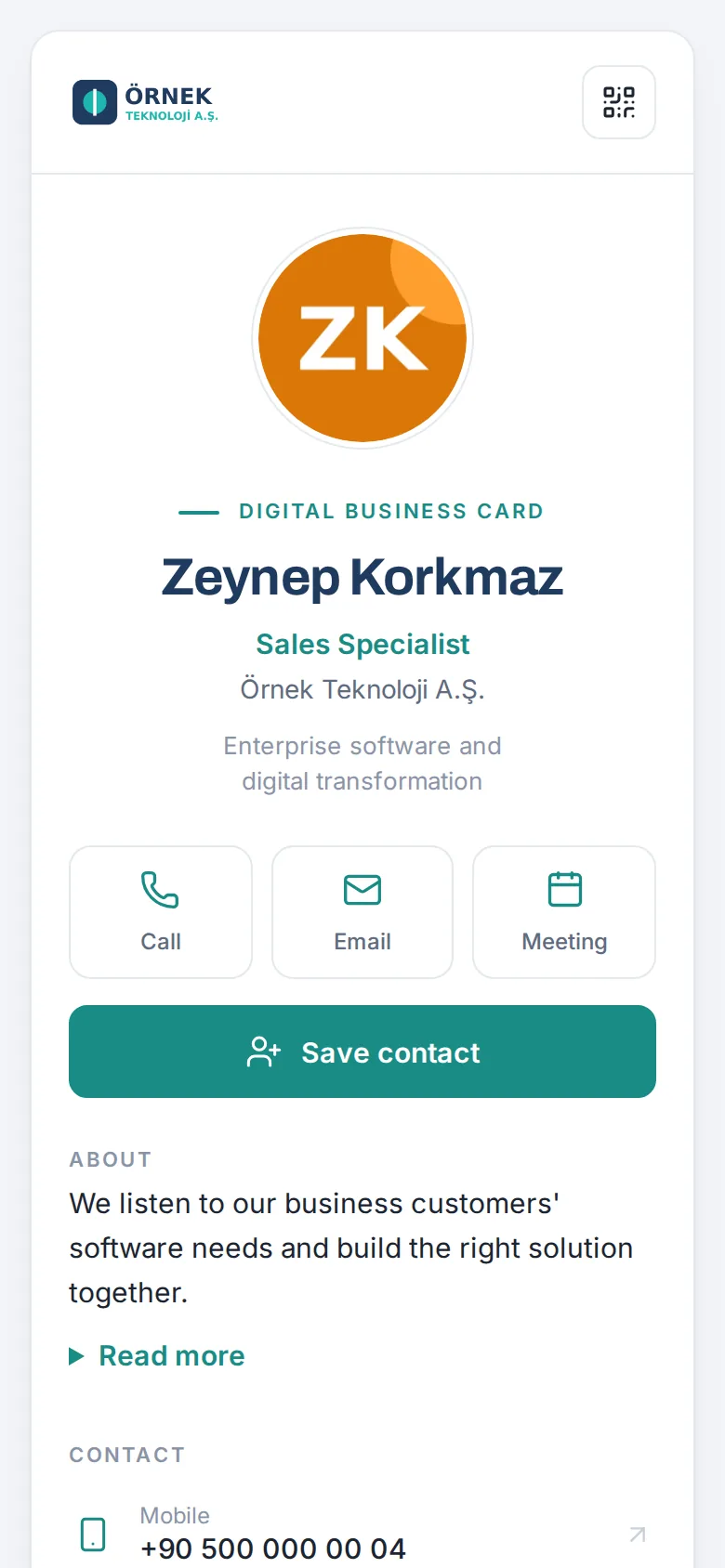
Personal page and QR code
Photo, title, office addresses, banners and group company logos. The QR code stays the same when details change; employees download it as PNG, or SVG for print.
Save the contact in one tap
The vCard works with iPhone and Android contacts and brings photo, address, website and LinkedIn along.
Self-updating Wallet pass
The Apple and Google Wallet pass refreshes on the device when the title or phone changes, and expires when the person leaves.
Leave your details
Visitors leave their own details and can photograph their own business card to fill the fields. A privacy notice must be accepted; marketing consent is separate.
Send the card and track it
Send the card to a customer by email, WhatsApp or SMS, with up to five colleagues' cards in the same message. See whether it was opened and saved.
Cards from the directory
Google Workspace, Microsoft 365 or Yandex 360 directories and SCIM 2.0 (Entra ID, Okta). New, departed and changed employees arrive as a preview.
Who can change what
Employees change only their photo, mobile, personal WhatsApp, LinkedIn and meeting link, each locked, approval-based or free. Name and title stay with admins.
Departed employee redirect
A leaver's printed QR code or old link opens the card of the person covering for them; the business cards they scanned are handed over too.
In the visitor's language
The card, the departed page and the contact form open in one of 9 languages based on the visitor's browser.
Fine details30 items
Card page
- Call, email, WhatsApp, meeting and "Save contact" buttons; the extension number and which offices appear are chosen per person.
- An absent employee's card says "Out of the office until …; … will help you"; the note comes from the leave record and disappears on return.
- Suggested colleagues are saved together with the card owner in a single vCard file.
- The meeting button opens a HubSpot meetings link or a Google Calendar booking page on a page on your domain.
- An About text and 16 social networks, each switched on or off separately.
- The small Prozence link at the bottom of the card can be switched off.
Sharing and tracking
- Emails go out with the employee's signature and replies come back to them; 40 emails per person per day, once every 12 hours to the same recipient.
- WhatsApp and SMS open the phone's own app with the text ready; no message is sent from the server.
- Status of a sent card: Not opened · Opened, not saved · Saved to contacts.
- Up to 3 reminders per card; the automatic reminder goes after 3 days, between 09:00 and 19:00.
- Send my card automatically: when a physical card is scanned and the person has an email address, the employee's card goes out on its own.
- NFC: on supported Android phones the card address is written to a tag; step-by-step instructions for iPhone.
Card management
- Staff screen: each employee's source (Google Workspace, Microsoft 365, SCIM, manual, bulk), status and sign-in method; CSV.
- Employees without a company email are added without touching WordPress and sign in with a personal email, mobile number or invitation link.
- Directory sync sets a direction per field: name from directory to card, photo from card to directory; you choose for title, mobile, department and manager.
- Automatic apply: new employees are added as draft or published; leavers are deactivated, at most 3 a day, only after two consecutive daily checks.
- Detail differences are never written on their own; you select and apply them in the preview.
- Bulk add of up to 50 people by pasting a list in the setup wizard.
Profile changes and approval
- For photo, mobile, personal WhatsApp, LinkedIn and meeting link separately: Locked · With admin approval · Direct. By default photo and mobile need approval.
- The approval screen shows old and new values side by side; the outcome reaches the employee by email and phone notification.
- Only admins change name, title, email, extension and office; the title is entered in Turkish and English.
- Role history: title and department changes are kept with dates.
Departed employees
- The printed QR code and old link open a "no longer with us" page and the successor's card; the leaver's contact details are not shown.
- If the successor has also left, the chain is followed for up to 5 steps; if nobody is left, the company's general contact shows.
- Scans of the QR code after the departure are counted.
- Apple and Google Wallet passes expire, sessions close and the person is removed from signatures and lists.
Measurement and licence
- Card views, contact saves and meeting page opens are counted; the card owner, signed-in users and bots are not.
- The same visitor counts once every 6 hours; only daily totals are kept, no visitor data, and totals are deleted after 400 days.
- Employees see the last 30 days of their own card in the "My card" box on the board.
- Only published, active employees count towards the licence; even when the licence expires the card page, QR code, vCard, Wallet and "Leave your details" keep working.
From meetings to the print shop,
one corporate look.
The brand team designs a template once; each employee's name, title and QR code are filled in from their own card. From meeting backgrounds to printed business cards, everyone uses the same corporate look.

Six image types
Meeting background, lock screen, phone home screen, desktop, LinkedIn cover and printed business card.
Company templates
Up to 12 templates per type with solid, gradient or image backgrounds. Areas that must stay clear, such as the clock, icons or a face, cannot be used.
Print-ready PDF
85×55 mm front and back with 3 mm bleed and crop marks.
Zoom, Meet and Teams
The meeting image uploads to the employee's Zoom profile in one click; a shared background set for Meet and Teams comes as one file.
Corporate profile photo
The background is removed entirely in the browser and the person is placed on the brand backdrop. The original photo never leaves the device.
NFC tag
On supported Android phones the card address is written to an NFC tag with one tap; step-by-step instructions for iPhone.
Brand and identity screen
Logos, colours, four card themes, fonts and a colour contrast warning on one screen, with live preview.
Branded app
The home screen icon, notifications and emails carry your company's icon and name.
Group companies
20 additional companies in one installation, each producing cards, signatures and wallet passes with its own logo, domain and offices.
Fine details14 items
Sizes
- Meeting background 1920×1080; lock and home screens 1179×2556 for iPhone and 1080×2400 for Android.
- Desktop 2560×1440 or 1920×1080; LinkedIn cover 1584×396.
- Printed business card 85×55 mm as a PDF with 3 mm bleed and crop marks.
Company templates
- Elements such as name, title and QR code are placed on a 3×3 grid.
- A default template and a "company templates only" option; downloads per template and an expiry date.
- The QR code is drawn automatically in the company's dark and accent colours.
Meetings and profile photo
- Zoom: employees upload their personal background to their own profile; when their details change it refreshes on its own, at most once a day.
- Up to 15 JPEGs for Meet and up to 50 PNGs for Teams in one ZIP file, with admin console steps.
- Corporate profile photo at 1024×1024; the background is removed in the employee's browser and no face recognition is used.
- Admins choose the brand backdrop and can make the corporate photo mandatory for new photos.
Card look
- Four themes: Classic, Cover, Dark, Simple. Photo as circle, soft square or square.
- Seven ready colour palettes and a colour contrast (WCAG 4.5:1) warning; the preview uses the selected employee's real card, without saving.
- Light and dark background logos and a square icon; PNG, JPEG or WebP.
- The card theme is one per company; additional companies appear with their own logo and colours.
The right signature and banner
on every email.
Signatures are designed and rolled out centrally; employees don't copy anything. Marketing prepares a banner, a manager approves it and signatures change on their own. Clicks are measured.

Central rollout
In Gmail, Zoho Mail and Yandex 360 the signature is written to each account. In Microsoft 365 an Exchange server rule adds it to every outgoing email.
Templates and assignment
Up to 20 templates assigned to a person, department or company. The preview shows who gets which template and why.
Banner slots and targeting
Date ranges and department or person targets; no banner internally, a banner for external recipients.
A/B tests
Two banners compete; the report shows the winner once the result is statistically significant.
Signature analytics
Emails sent, clicks and click rate; the most clicked element and whose signature gets the most attention.
Approval flow
Disclaimers, design, templates and banners can each require approval; nobody can approve their own proposal.
Disclaimer rules
Different, optionally bilingual confidentiality notes by company and department.
Short signature, out of office, social
A short signature for replies, a dated out-of-office line and 16 social networks switched on one by one.
Customer satisfaction line
A one-click "Were you happy with this conversation?" question in the signature. Customers stay anonymous and security scanners don't count as votes.
Fine details16 items
Rollout
- In Gmail only the signature settings permission is used; Prozence does not read or send mail.
- "Check Gmail" compares the signature in Gmail with the current one; the previous signature can be restored.
- Gmail's 10,000-character limit is checked; if a signature doesn't fit, social icons are dropped and it is written without tracking links.
- In Microsoft 365 the company's admin sets up the Exchange rule; this route has no photo or signature analytics, and the signature is not added twice in reply chains.
- Employees whose signature changes get an email with a preview and setup steps.
Design and templates
- Layout with the logo left, on top, no logo or single column; 8 email-safe fonts; each signature element switched on or off.
- Assignment order: person, department, company; settings are previewed before saving.
- Long, short and plain-text signatures; links in the plain-text version are personal and measured separately.
- The out-of-office line shows for a date range and disappears afterwards; the Gmail signature is rewritten at the start and end.
Banners and measurement
- Up to 6 banner slots in the signature; changing a banner doesn't require rewriting signatures.
- Target everyone or a company, department or person; groups that stay banner-free are chosen separately.
- In A/B tests employees are split randomly into two groups; the result is reported at 95% confidence with at least 100 views per banner.
- Clicks, approximate opens, emails sent from Gmail per day and click rate; a ranking of people.
Approval and satisfaction
- Disclaimers, design, templates and banners can each require approval; the last 200 changes are kept.
- The satisfaction line reads "Great · Okay · Poor"; a rating is saved only when the customer presses Send.
- "Poor" ratings reach the satisfaction leads together with the comment; ratings are deleted after 12 months by default.
Every business card collected
stays in the company's memory.
Business cards that used to get lost in employees' phones are collected in a shared, duplicate-free company catalogue. Who knows whom, whose title changed, which customer nobody has spoken to in a while: all on one screen.
AI details
AI reading
Business cards, trade-show badges, QR codes and email signatures are read; sideways or upside-down cards are corrected and doubtful numbers flagged. You approve the record.
Add contacts any way
Share from phone contacts, import vCard, Excel or CSV, or simply forward an email to the shared inbox.
Duplicate-free catalogue
When the same person comes in again no new record is created; empty fields fill in and the history grows.
Who on the team knows them
Who in the company knows a customer, when they last met, and other people from the same company.
Filters and saved views
Filter by tag, date, who added, source, CRM and consent status; save the view and share it as a link.
Company enrichment
Website, industry, headcount, headquarters, stock ticker and technology park or R&D centre status. Manually entered data is never overwritten.
Job and company changes
When a customer changes title or company you get a suggestion; the record does not change until you approve.
Cooling contacts and reminders
People nobody has contacted for a long time are flagged; follow-up reminders and a monthly summary.
Voice notes
Meeting notes are dictated; an optional AI summary suggests the next step. Prozence never receives or stores the audio.
Consent per channel
Consent to commercial messages is recorded separately for calls, SMS and email, with how it was obtained; it starts empty on every new card.
Fine details17 items
Ways to add contacts
- Front and back of a business card, trade-show badge, QR code, email signature, sharing from phone contacts, vCard, Excel and CSV.
- Forwarding a customer email to the company's shared inbox is enough; the inbox is read every 5 minutes and up to 5 people are added per email.
- People who only appear in the recipient list, the company's own domains and newsletter footers are not added; unverified emails are held back.
- Cards photographed without a connection queue on the device; they are read once online and linked to the event they were taken at.
Catalogue
- A second person scanning the same card claims it without changing the record; if it sits in someone else's unshared list, an access request is sent. A tag is required by default when adding a card.
- "Who can see" on notes: just me, my department or everyone who can see the record.
- A customer company's org chart is built from Turkish job titles: 8 levels and 11 departments.
- Customer contacts' birthdays are reminded only to employees who can see that person.
- In the share window, colleagues you share with often are starred as favourites and stay at the top.
Filters and bulk actions
- Tags with "any", "all", "excluding" and "untagged"; date added and last contact, added by (me, my team, a person), source, CRM and consent status.
- Sorting and up to 20 saved views; the filter lives in the address bar.
- Bulk tagging and export on the filtered list; actions on selected people.
- The filter panel opens from the right on a computer and from the bottom on a phone.
Follow-up
- People whose title or company changed have their own filter and "New title", "New company", "Left the company" badges.
- Voice notes last up to 3 minutes; speech is transcribed in the browser, and AI summarises it only if you ask.
- A small copy of the card photo is attached to the record; the person who scanned it and admins can see it, and a setting turns it off.
- With Projects and tasks on, a person's details include a Projects section: projects linked to this client that you can see, open tasks and effort; "New project for this client".
Back from the show,
the list is ready and the CRM is full.
In event mode every card scanned is linked to that show and added for the whole booth team. Afterwards, thank-you emails go out with staff approval and contacts reach the CRM with the right owner and tags.


Event mode
Cards scanned during the show are linked to the event and shared with every booth staff member.
Interest and qualification
Hot, warm and cold interest; areas of interest and scored qualification questions.
Booth page and QR poster
A booth page where visitors leave their details, in the visitor's language.
Event board and comparison
Cards collected, hot leads, cost per card and side-by-side comparison of shows.
Post-show email
Thank-you emails go out with staff approval, once per person per show.
Direct links to 7 CRMs
HubSpot, Salesforce, Dynamics 365, Zoho CRM, Pipedrive, Bitrix24 and Odoo, plus signed webhooks.
Only the right people reach the CRM
Service providers such as banks, accountants and suppliers are not sent to the CRM.
Owner and field mapping
Owner assignment rules, shared field mapping and reading back from the CRM.
Error queue
Records that fail to reach the CRM are not lost; they are retried and the reason is shown to admins.
Fine details14 items
Trade shows
- Show set-up: venue, booth, dates, staff, areas of interest and optional cost; event mode switches on by itself when staff open the app during the show.
- Up to 5 qualification questions per show (e.g. "Is there a budget?" Yes 10, No 0); the score is calculated as the card is added and the top 10 appear on the board.
- The booth page and QR poster come in 9 languages and close 30 days after the show ends.
- Thank-you emails go out once staff preview and approve them; each visitor gets one per show.
- The past year's shows in one table: cards, hot, warm, cold, average score, cost per card and per hot lead.
Transfer to the CRM
- People and companies are added without duplicates, matched first by CRM ID, then by email and phone.
- The record owner is the CRM user of the employee who collected the card, or set by owner rules based on tag, show, source or city.
- A shared field mapping table sends source, tags, title, show, interest level and marketing consent to the CRM fields you choose.
- Touchpoints are kept as CRM notes: scans, card sends and details left. The employee's own notes and voice note summaries are not sent by default.
- Read-back from the CRM: stage and owner are read hourly, and changes leave a note on the person's record.
Errors and consent
- Temporary errors are retried 6 times at intervals growing from 5 minutes to 12 hours; permanent errors show with their reason in the admin screen.
- A "Send to CRM" setting per tag; a service provider who also carries a sales tag is still sent.
- Marketing consent and the privacy note travel to the CRM; if consent is withdrawn, the CRM is set to "No" too.
- In a group set-up, contacts collected by an additional company don't go to the parent company's CRM unless enabled.
One place where everyone
is on the same page.
Announcements don't get lost in crowded inboxes. The board shows each employee their own tasks, the approvals waiting for them, the policies to read and news from their team.

Targeted announcements
By company, department or person; Info, Important or Critical level, featured posts, view rates and sharing on LinkedIn.
"Read and understood"
An announcement can ask for confirmation; on long texts the button becomes active once the text is opened. The author sees an "N viewed · M confirmed" counter and who hasn't confirmed, by name.
Policies with read confirmation
Reaching the end of the text and reading time are recorded; reminders go to those who haven't confirmed.
Company surveys
Single choice, multiple choice, 1–5 ratings and open text; named or anonymous. Results of an anonymous survey open only when it closes, for its creator too.
Pulse
Short, regular and anonymous employee pulse. Small groups are protected and trends show over time.
Suggestions and complaints
Optional anonymous submission; the sender is never stored. Reward points for suggestions put into practice.
Onboarding and offboarding
Checklists from templates; department tasks land with the right team as requests.
Directory and org chart
Company directory, org chart, employee profiles and a "Who knows about this?" search.
9 languages and channels
Announcements are translated into the employee's language and also posted to Slack, Microsoft Teams and Google Chat.
Today card
Awaiting your approval, your to-dos for today and today's calendar on one card; managers also see My team today, HR sees Operations. Sections are ordered by role.
My requests
Your leave, expenses, requests, purchases and other records in one list; each line shows who has it now and the next step.
Edit dashboard
Reorder or hide cards within their column; your layout applies on all your devices. The Admin sets a default layout for employees, managers and HR.
Fine details30 items
Today and My requests
- The Today card shows only the person's own records; modules that are switched off don't appear.
- Approval lines show how long the oldest record has been waiting; 2 days or more is highlighted.
- Unread Important and Critical announcements come first among the to-dos.
- My requests covers 12 types: leave, expense, advance, request, purchase, attendance correction, overtime, asset, shipment, health and safety report, candidate referral and profile change.
- Open records always appear; completed ones for the last 12 months.
Edit dashboard
- The order changes with the ↑ / ↓ buttons or Alt+↑ / Alt+↓ on the keyboard; a card stays in its own column.
- Today, Featured announcements, Announcements and Policies are required: they can't be hidden, only moved.
- "Reset to default" returns to your role's default layout; role defaults are set in the WordPress admin.
- In the tabbed layout the Today tab is edited; there is no drag and drop. Also in the free version.
Announcements
- Publishing rights per person: none, own department or the whole company. Level Info, Important or Critical; phone notifications are on by default for Critical.
- Categories: Announcement, News from us, New joiners, New role, Work anniversary; the last three show with the employee's card.
- PDF, PNG or JPEG attachments up to 8 MB; attachments open only for the employees targeted.
- Featured for 1, 3, 7, 14 or 30 days; at most 2 featured announcements at a time.
- Share on LinkedIn: employees share in LinkedIn's own window, and the author sees the click count.
- Reports show recipients, viewers, view rate, "Read more" clicks and likes; reach by department.
Policies
- Versioned text; "Requires acknowledgement" or "For information", target, deadline and effective date.
- The confirmation box opens only after reaching the end; first and last open, visible time and a fingerprint of the confirmed text are recorded.
- A new version asks everyone to confirm again and shows a "What changed in this version" note.
- Reminders in the last 3 days, at the deadline and weekly afterwards; per-person report and CSV.
Surveys and pulse
- Up to 20 questions per survey; anonymous results open when the survey closes and has at least 3 answers, department breakdowns only for groups with 5 or more.
- Pulse: a recommendation question (eNPS) and four short questions; weekly, fortnightly or monthly rounds.
- Pulse answers store neither the person nor the time; the privacy threshold is at least 5 answers and can't be lowered, departments show only the average and eNPS; trend over the last 12 rounds.
Suggestions and onboarding
- Anonymous submissions have their time rounded; replies are checked with a tracking number and a key shown only once.
- "About my department" goes to the manager on the org chart; other topics go to that topic's readers.
- Suggestions put into practice earn points (10 by default); anonymous senders claim them with their key.
- Onboarding tasks can be owned by the employee, manager, buddy, HR, IT or facilities; IT and facilities tasks open as requests.
Notifications and channels
- The "Waiting for you" bell gathers announcements, policies, surveys, pulse, invitations and approvals.
- Weekly summary email: what's waiting, the last 7 days' announcements, the next 7 days and new posts; nothing is sent if there's nothing to say.
- Up to 10 Slack, Teams and Google Chat channels; only company-wide events are posted and no personal data is sent.
- Microsoft Teams app: Prozence and My approvals tabs; notifications also land in the Teams activity feed.
The question everyone asks
is written down once.
Company knowledge sits in one place, category by category. Every article has its own visibility rule; employees see only what they are allowed to. Outdated articles are flagged, and "Ask the wiki" answers with its sources.
AI details

Categories and articles
Editors per category; formatted articles with tables, Tip and Caution boxes and links between articles.
Who can and can't see
Separate rules for each article and category: department, person, role, module permission or managers with a team.
Test with a person
While editing, "N people can see this now"; pick an employee to check whether they can see it, and why not.
Version history
The last 10 versions with who changed what and when; go back to an older version in one click.
Review date
12 months by default; readers see a warning on overdue articles and editors get reminders.
Turkish-aware search
Typing "sifre" finds "Şifre"; searches with no results come first in the report and show what needs writing.
Ask the wiki
AI answers only from articles the person asking can see, and shows its sources; if nothing relevant exists, it isn't called.
Was this helpful?
Yes or No; a "No" note goes to the category editors. Read counts and helpfulness rates in the report.
Announce to readers
A new article is announced by phone notification or email only to employees covered by its access rule.
Fine details16 items
Writing
- Up to 30 categories; admins and general editors write everywhere, category editors only in their own category.
- Articles up to 30,000 characters with up to 15 tags; pinning and drafts (only editors see drafts).
- HTML is not accepted; images are added by address and enlarge when clicked.
- Four starter categories: IT and accounts; HR, leave and payroll; Office and facilities; General.
Access rules
- Any one of the selected groups is enough; "Who can't see" always applies first.
- An article's rule can narrow its category's rule but not widen it.
- The same rule applies to lists, search, read counts, notifications, chat channel posts and Ask the wiki.
- An article you can't see shows "Article not found", so its existence doesn't leak. Leavers see no articles.
Reading and measurement
- Three columns on a computer: app menu, wiki tree and reading area; the "On this page" list highlights as you read.
- Opens by the same person within an hour count once.
- Reports show numbers only: readers, total reads and helpfulness rate; who read what is not listed.
- Search terms are counted without recording who searched; last 180 days.
The user guide in the wiki
- The Prozence user guide, 41 chapters with screenshots in nine languages, arrives in the wiki and updates itself when a new version is out.
- Each chapter comes with its own access rule; admin chapters are visible only to the relevant roles.
- Chapters changed by an editor are kept on re-import.
- Texts that need acknowledgement use "Company policies"; the wiki has no read confirmation.
Listings, invitations, thank-yous:
the team's own square.
On the Team square employees post listings, send invitations, run polls and say thank you. Birthdays and work anniversaries are celebrated. For every post, the person posting chooses who sees it.


Listings
For sale, for rent, free to a good home, wanted, lost and found, and car sharing; up to 3 photos. "Message the poster" is visible only to the two people involved.
Invitations and RSVP
Engagement, wedding, birth, graduation or event invitations; with a date, time and place, people answer Going, Maybe or Can't go.
One-question poll
2–6 options; results show to everyone as percentages and votes, while who chose what is visible only to the person who created the poll.
Thank-you card
The person thanked always gets a notification and an email; their profile shows how many thank-yous they received.
Recommendations and "Heads up"
Restaurant, café or tradesperson tips with 1–5 stars; office, safety and shared-space warnings with a red border.
Birthdays
The birth year is not stored. A birthday shows only if the employee allows it; on the day they get a greeting email and notification.
Anniversaries and celebrations
A "Celebrations · 7 days" box; new joiners, new roles and anniversaries under "Team news".
Messages
One-to-one and group chat inside the app on Google Chat; Prozence doesn't store messages. Prozence's own messaging is in the Chat module.
Who sees it
The whole company, my department only, selected people, or everyone except the people I select.
Fine details17 items
Posting rules
- Board rules are accepted before posting; up to 10 posts and 60 comments per person per day.
- "Report inappropriate content" notifies admins; a post is hidden automatically after three separate reports.
- Listings stay up for 30 days by default, at most 90; expired posts are archived and the archive is deleted with its photos after 180 days.
- Location data is removed from photos; photos are shown only to signed-in employees.
- Each post type can be switched off separately by admins.
Notification preferences
- Employees choose by type: invitations, thank-yous, "Heads up", listings, polls, recommendations and useful content.
- By default invitations and thank-yous are on; listings, announcements and polls are off.
- Thank-yous and listing messages addressed to the person can't be switched off.
Birthdays and anniversaries
- Only the day and month are stored; employees enter it themselves, and HR can too.
- Visibility depends on two things: the employee's consent and the company setting (whole company, department or nobody; department by default).
- The greeting can be edited; if the employee consented, their team is notified too.
- With more than 200 active employees, only milestone anniversaries are shown company-wide.
Messages
- Each employee connects their company Google account once; personal Gmail accounts can't be connected.
- An "Everyone" space at the top of the list; one-to-one chats, groups and spaces, and chat search.
- Messages up to 4,000 characters; instant phone notifications come from the Google Chat app.
- Google Meet meeting chats are hidden by default; use Google Chat for attachments and reactions.
- There is no chat for Microsoft Teams; in Teams there is the Prozence tab and notifications.
Holidays, leave, events
and your own meetings.
The company calendar shows public holidays, company events, celebrations and who is on leave. Employees see their own Google or Outlook calendar on the same screen, and meeting room bookings sync both ways with Google Calendar.


The next 14 days
Holidays, events, birthdays, anniversaries, leave and customer birthdays; filters and colours by type.
Public holidays and external calendars
Turkish public holidays come ready; up to 5 external ICS calendars (e.g. a compliance calendar) refresh every 12 hours.
Company events
People with publishing rights add all-day events for the whole company or a department; an event can last up to 60 days.
On leave · Covered by
Approved leave shows as "On leave · Covered by …"; the company calendar never shows the type of leave.
Add to my calendar
A personal subscription address is added to Google Calendar or Outlook; renewing it stops the old one working.
My calendar
The next 14 days of your own Google or Outlook calendar; the Join button opens the Meet, Teams, Zoom or Webex link.
My meetings
The next meeting and "N more meetings today" on the Today screen.
Rooms and Google Calendar
A room booked in Prozence is written to Google Calendar; a meeting set up in Google with a room comes into Prozence and external guests land on reception's list.
Meeting scheduling
A HubSpot meetings link or Google Calendar booking page opens from the card and signature, on your own domain.
Fine details14 items
Subscription
- The subscription is one way, from Prozence to your calendar app, covering the last 30 days and the next 365.
- Entries are all-day and don't show the person as busy.
- Google and Outlook refresh subscriptions on their own schedule, every few hours.
My calendar and privacy
- Primary calendar only, read only: meetings are created and answered in Google Calendar or Outlook.
- Only the person themselves sees it; meetings marked "Private" in Google show as "Busy".
- Declined and cancelled meetings are hidden; meetings aren't stored, only cached for 5 minutes.
- Employees can choose "Don't show my calendar here".
- Works with domain-wide delegation in Google and with the Calendars.Read permission and admin consent in Microsoft 365.
Room sync
- Google Workspace only; Microsoft 365 room calendars aren't supported, and there "Add to calendar" downloads an .ics file.
- Events written from Prozence send no invitation emails; cancelling removes the Google event.
- The booking form warns about times when the person is busy in their own calendar.
- Meetings set up in Google arrive within 10–15 minutes; changes and cancellations follow, and these bookings can't be cancelled from Prozence.
Meeting tools
- The Zoom connection uploads virtual backgrounds; Zoom, Meet or Teams meetings aren't created from Prozence.
- Appointments are booked in HubSpot or on the Google booking page; Prozence shows that page at your own address.
The moment a guest walks in,
their host knows.
Employees register their guests in advance and reception welcomes them on one screen. Guests can also scan the QR code at the entrance and check themselves in. Once they are let in, the host is notified and the guest gets a welcome email; in an emergency, visitors inside are on the list too.


Pre-registration
Employees tap "Expecting a visitor": day (up to 60 days ahead), time, name, company, number plate, email and a note for reception.
Reception screen
Expected, Inside and guest parking occupancy in one strip; the list refreshes every 30 seconds.
QR self check-in
Guests who scan the QR code at the entrance enter their name, company and who they are visiting; no app or sign-in needed.
Host notification
When the guest is let in, the host and colleagues in the meeting get a "Your guest has arrived" notification.
Welcome email
The guest receives the host's business card, address and floor directions, guest Wi-Fi, house rules and an "I've left" link.
Check in with a business card
The guest's business card is read and matched with today's expected guests; the card is added to the host's customer directory.
Badge and check-out
A credit-card-sized visitor badge; check-out by choosing a gate or with the same QR code.
Log and reports
Search by date, status, name, company or plate; CSV. "Who visited me", most frequent companies and average stay.
Visitors in an emergency
Visitors inside appear on the I'm safe board; when an emergency is declared, they get exit and assembly point details.
Fine details16 items
The self check-in page
- A secret-key address; the poster prints on A4 or stays open on a tablet. Renewing the key retires the old QR code.
- The page uses no JavaScript; 15 seconds after check-in it returns to a blank form for the shared tablet.
- Searching for the person being visited shows at most 6 results, so the staff list doesn't leak.
- If a pre-registered guest's name matches, that registration is checked in.
- Guests check out by scanning the same code; the shared tablet shows initials only.
Notifications and reminders
- "Has your guest arrived?": the host is asked once if the guest hasn't been let in 15 minutes after the expected time.
- Hosts can tap "Arrived, let in" or "Didn't come" without waiting for reception.
- The host is notified when the guest leaves; guests not checked out get an "end of day" check-out overnight, and no-shows are marked "Didn't come".
- If an SMS provider is set up, the guest also gets a short welcome text.
Privacy
- A privacy notice must be accepted on every check-in route, and the time of acceptance is recorded.
- No ID document, photo or signature is collected; business card photos aren't stored, and the phone number is optional and visible only to reception.
- Records are deleted after 180 days by default (7–730 days).
- Guest names, emails and plates are visible only to the host, colleagues in the meeting and reception.
Things to know
- Pre-registration sends nothing to the guest; the welcome email goes out when they are let in.
- The welcome email and visitor pages are in Turkish.
- There is no link to turnstiles or door systems; badges print from the browser.
Rooms and parking spaces,
booked in a few taps.
The day planner shows which room is busy when. Guests added to a meeting are announced to reception in advance, and their number plates to the car park.


Day planner
Busy times, who booked and the title for every room and parking space; room capacity, floor and equipment.
Booking a room
Times in 15-minute steps, a title and number of people; up to 30 guests and 30 colleagues can be added.
Busy times and nearest free slot
The form shows the room's busy times for that day; if the chosen time is taken, the three nearest free slots are suggested. A second booking for the same time is rejected, even if both arrive at the same moment.
Parking space
The number plate is required; company cars are filled in. Guest plates are given in the meeting form.
Guest parking
Set a capacity; a guest with a plate holds a space for the booking, and you are warned when it's full.
Reminders and invitees
A notification 15 minutes before; colleagues added get "You've been added to a meeting" and "Meeting cancelled" if it's cancelled.
Two-way with Google Calendar
For companies on Google Workspace, rooms are written to Google Calendar and meetings set up in Google come into Prozence.
Add to calendar
Without sync, an .ics file adds the booking to Google, Outlook or Apple calendars.
Rules
08:00–20:00, up to 30 days ahead and meetings of up to 8 hours by default; maximum duration and a daily limit for parking spaces. All adjustable.
Fine details9 items
Administration
- Up to 60 resources: meeting rooms or parking; capacity, floor, equipment and Google resource calendar.
- A room can be closed temporarily with the "Open for booking" box.
- Reception can cancel someone else's booking, and the owner is notified.
- Past bookings are deleted after 3 months by default, together with guest and plate details.
- Up to 30 bookings per person per day.
Things to know
- There are no recurring bookings and no automatic release of rooms when nobody turns up.
- When the number of people exceeds room capacity a warning appears; the booking isn't blocked.
- There is no hot-desk booking.
- There is no sync with Microsoft 365 room calendars.
Parcels, post and official notices,
on record, handed over with a code.
Every incoming item is logged, the recipient is notified and handover happens with a four-digit code. Employees also open outgoing courier or parcel requests from their phone and follow them in four steps.
AI details

Nine item types
Parcel, envelope, documents, official notice, courier, food, flowers, bank or credit card and other; notifications by type: "Your flowers have arrived".
Reading the label
Recipient, sender, carrier and tracking number are read from a photo of the shipping label; the recipient is suggested.
Handover with a code
With the 4-digit code on the recipient's screen; the staff member and time are recorded. Handover without a code only by an authorised person, with a reason and the collector's ID declaration.
Covering colleague
If the recipient is on leave, the desk is warned and the covering colleague is notified too.
"I did not receive it"
The recipient is notified of the handover and can object if they didn't get it. Bank cards, legal notices and "code only" items are never handed over without a code.
Reminders
Up to 3 reminders for uncollected items; none for food and flowers.
Shelf and photo
Shelf or location and a photo of a damaged package are added to the record.
Outgoing parcels and couriers
Recipient, address, content category, who pays (sender or recipient) and urgent same-day courier.
Four steps
Request received, In the mailroom, With the carrier, Sent; the tracking link comes from the carrier template.
Log and report
Incoming and outgoing log by month, CSV; who sent how many, by carrier, category and department.
Fine details14 items
The mailroom desk
- Its own screen, the same on computer and phone. The list refreshes every 30 seconds without clearing the form.
- Record numbers by year and sequence; items awaiting pickup show "waiting for 2 days".
- After 5 wrong pickup codes the item is locked; an authorised mailroom user unlocks it and a new code goes to the recipient.
- Label reading allows 200 a day per person; without an AI key the details are typed in.
For employees
- The parcels and post box shows the pickup point and the code in large letters; the code is visible only to the recipient.
- Notes by type: collect official notices and bank cards in person.
- Arrival is notified by phone and email; on handover, "Collected by: …".
- Outgoing requests can be cancelled only while "Request received" or "In the mailroom"; 20 requests per person per day.
Administration
- A list of carriers and a default carrier; the tracking address template inserts the number.
- Pickup point, first reminder day (2 by default) and retention (12 months by default).
- Roles: handler (desk, handover, outgoing) and viewer (log).
Things to know
- Status is not pulled from carriers automatically; "Delivered" is marked by hand.
- Official notice is an item type; there is no e-notification service or legal service record.
- No signature or photo is taken on handover.
From request to asset,
one trail.
Employees write what they want to buy, why and where from, and add alternatives and why they chose this one. Approved requests move to the procurement list; delivered items become assets in one click and can be assigned to the requester.


IT and facilities requests
Type, category, title and "What for?"; categories are set per company.
Items and alternatives
Up to 10 items: brand, model, quantity, price, currency, supplier and product link; 3 alternatives per item and "Why this one?".
Management approval
One approver's decision is enough; if an approver list is set, only they decide. Questions are asked with "Ask for info"; nobody can approve their own request.
Purchase without approval
Authorised people can buy below a set TRY limit without approval; the request is marked "Without approval (authorised)".
Procurement list
Approved, Ordered, Received; an order note, expected delivery, delivery note and partial delivery. Requesters can't place their own order.
Into assets
A received item becomes an asset with serial number, location and warranty, and can be assigned to the requester.
Digital handover
Employees confirm "Received"; handover, return and loss forms print. Loss, damage and faults are reported with photos; a fault report opens an IT request.
Return condition and photos
On return, the condition is chosen (Intact, Signs of wear, Damaged, Missing part, Not working) and up to 3 photos are added; for Damaged or Not working, a fault record and IT request are suggested.
Device replacement and archive
When a faulty device is replaced, the new one is assigned to the same person and both records are linked as "replaces / previous". Records are archived, not deleted.
Stocktake and QR labels
QR labels on A4 and stocktakes with the phone camera; import up to 1,000 rows from Excel or CSV.
Reports
By category, type, department, person and status; TRY and foreign currency kept separate, CSV.
Fine details20 items
Requests
- Currency TRY, USD or EUR; quantity 1–100,000.
- Alternative prices are not added to the total.
- The request history shows opening, decision, order and delivery, with who decided and the reason for rejection.
- Requesters can cancel before the order is placed.
- A request can optionally be linked to an open project you can see; an approved request counts as actual spend in the project budget. The project can't be changed later.
Notifications
- New requests reach approvers by phone notification and email.
- Approval, rejection, order and delivery are notified to the requester.
- On delivery, asset handlers get an "add to assets" notification.
Assets
- Each unit gets its own asset number; value, supplier and purchase date come from the purchase record.
- The fault assessment when closing an incident is for the record only; nothing is deducted from pay.
- A reminder before the warranty ends (30 days by default).
- In a stocktake employees answer "I have it" or "I don't"; one open stocktake at a time.
- A fault report opens an IT request (setting, on by default); closing the request doesn't close the incident, and the asset manager is notified.
- An allocated company vehicle is added to the person's assets as "Vehicle: plate — model"; removing the allocation returns it, a new driver takes it over.
- For serious conditions (Damaged, Missing part, Not working) a return note is required; the condition and photos appear in the handover history and on the return record.
- Return photos open only for the asset officer, viewers and the employee who returned the item.
- Fault suggestion setting: suggest (default), open automatically or off.
Things to know
- Approval is single-step; if the Workflows module's Purchasing template is on, a request above the threshold (default TRY 50,000) gets a single extra approver, but there is no multi-tier approval.
- There is no cost centre, quote collection or purchase order document; a request links only to a project budget and isn't counted in the company budget (Budget and actuals).
- Foreign currency amounts aren't converted to TRY; reports show them separately.
The office's daily errands,
from a phone and on record.
Repairs, supplies and building requests are tracked against target times. The menu, meal attendance and shuttle times are in the same app, and passengers know when the shuttle sets off.

Requests
IT faults, facilities, supplies and building maintenance; priority, location and photo.
Target time
Hours per category; a quarter for urgent requests, half for high priority. The clock stops while waiting for information.
Canned replies and internal notes
Up to 30 canned replies; internal notes the requester doesn't see.
Outcome and satisfaction
"Resolve request": Resolved, Not resolved or Rejected, with a required note to the requester. The requester rates it 1–5 or reopens it with a reason within 7 days.
Request summary
Open and overdue requests, first response and resolution times, share resolved on target and satisfaction.
Menu
Monthly menu uploaded by CSV; an "I'm not eating today" cut-off (10:00 by default) and a daily summary for the kitchen.
Menu ratings and cafeteria
1–5 ratings and anonymous comments after lunch; cafeteria entry and guests with a QR code that changes every 30 seconds.
Shuttle routes
Lines, stops, times and seat occupancy; employees enter their district and a suitable line is suggested, with an alternative when a line is full.
Live shuttle
The driver screen needs no sign-in: "Set off", "Done" at each stop, delays; passengers get "Approaching your stop".
Overtime shuttle
A separate trip for overtime outside the regular runs: date, time, vehicle, driver and stops; invitees answer Attending or I won't attend.
Fine details13 items
Requests
- 5 requests per person per minute and 40 per day; photos up to 4 MB.
- Default target times: IT 8 hours, facilities and building 24 hours, supplies 48 hours.
- When a target is missed the assignee is notified once; time is counted in calendar hours.
- Closed requests are deleted with their photos after 24 months by default.
- IT and facilities onboarding tasks open as requests and are completed when the request is resolved.
- Statuses: New, In progress, Waiting for info, Resolved / Not resolved / Rejected – closed, and Cancelled.
- A request is handed over to someone else with a reason and moved if it was filed under the wrong category; internal notes never reach the requester.
- A fault report on an assigned item opens an IT request automatically; a request is converted into a task with one tap.
Meals, shuttles and vehicles
- Employees on leave are taken off the meal count automatically.
- Managers see menu ratings as anonymous averages and comments.
- The driver screen shows occupancy, guest passengers and "Boarded" or "Not boarded" for each passenger.
- Shuttle suggestions take only a district, never a full address; the district is visible only to the employee and the shuttle managers.
- Vehicle allocation: plate, service, inspection, insurance and comprehensive cover dates; employees are notified as dates approach. An allocated vehicle is added to the person's assets.
Earthquake, evacuation or near miss:
nobody is forgotten.
In an emergency you need to know within minutes who is safe. The "I'm safe" check-in goes to everyone at once, answers gather on a live board and visitors inside the building are on the list too.


"I'm safe" check-in
One-tap answer; it can also be answered from the email link without signing in.
Siren and one-time location
People who haven't answered get a full-screen alert and a siren (a short tone in drills). Location is taken once, only when answering; without permission the answer goes without it.
"I need help" alert
People asking for help jump to the top of a red list; emergency leads, health and safety, team leaders and first aid and rescue teams get an instant notification and email. Whoever reaches them marks "Reached".
Visitors inside
Guests in the building at that moment are added to the check-in during an evacuation.
Action plan and teams
The emergency action plan and response teams on everyone's phone; the team screen shows how many people are needed and missing.
Emergency contact person
Employees add up to two relatives in My profile; only the Admin, emergency leads and health and safety staff see the list, never on the card or in the directory.
Report, then deletion
When the check-in ends, a printable report and CSV are created and drills are logged automatically. Locations are deleted when the check-in ends; per-person rows in the report after 24 months by default.
Safety reports
Near misses, hazards, unsafe behaviour and work accidents (with a 3-working-day countdown for the social security notification); optional anonymity and corrective actions closed with evidence.
Workplace doctor
Appointments and end-to-end encrypted messages; the content cannot be read on the server.
Works even when locked
The "I'm safe" check-in stays available in every licence state.
Emergency banner
When a lead chooses the type and confirms, every employee sees a red banner with instructions, assembly point and phone numbers.
Fine details8 items
I'm safe
- A real alarm needs an extra confirmation; "Drill" is selected by default.
- Answers given offline queue on the device and are sent when the connection returns.
- Regular reminders to those who haven't answered, with an escalation to their manager.
- In a real alarm the siren plays for up to 3 minutes; a web page can't play sound while the phone is locked or the app is in the background, so the phone notification arrives instead.
Emergency plan
- "Emergency" in the top bar for everyone: phone numbers with 112 first, emergency leads, and instructions for earthquake, fire, workplace accident, electrical fault and flooding.
- Locations of emergency exits, extinguishers, the main switch, water valve and first aid cabinet; assembly points and an evacuation plan.
- The number of people needed in response teams is calculated from the hazard class and headcount; expired and expiring certificates are shown.
- Drill records and a plan review date; "I'm safe" drills are added to the list automatically.
Four ways to clock in,
whichever the company wants.
Employees clock in from their phone. In the office there is a rotating QR code on the screen at the entrance, the office network and location; working from home, remotely or in the field has its own button. The company chooses which checks apply, office by office, and lateness, overtime and timesheets follow each person's own work pattern.


Four ways to record
Office QR code, office network, out-of-office records (home, remote, field) and location checks in the field; each switched on separately.
Rotating QR code
The tablet at the entrance shows a new code every 30 seconds; a photo of the screen is useful for a minute at most. The code is read with "Scan QR code" in the app; optionally an iPhone camera scan also opens the app and records the entry.
Office network and location
The office IP address, a dynamic DNS name without a fixed IP, or the office Wi-Fi in the mobile app; office location and radius (200 m by default).
Automatic clock-in
On the office network, the clock-in is recorded when the app opens, comes to the front or the network changes; "Undo" for 15 minutes. If the company prefers, the first record asks "Clock in now?".
Automatic attendance (office mode)
Prozence mobile app 1.7.0 and later detects entering and leaving a zone (geofence) set up around the office, even while the app is closed. Depending on the company setting it asks "Clock in now?" or records the clock-in directly; the clock-out is written after a 10-minute buffer, with the time you left. With explicit consent, only if the company turns it on.
Location stays on the phone
No coordinates or Wi-Fi identifiers go to the server; only the clock-in / clock-out event signed by the phone, with its time. Nobody can see where an employee goes or where they live. On work-from-home, leave and holiday days location is never used.
Selfie
Optional, at clock-in with the front camera; no face recognition, and the photo is deleted after 30 days by default.
Combined checks
QR code, office network, location and selfie can be required together, company-wide or office by office. Working from home never requires a QR code, location or network details; a selfie only if the company selects it.
In the field
Field days in the work schedule; field locations are kept apart from offices and the customer is picked with "Which customer are you with?". Location and a selfie at clock-in can be required.
Work patterns
Office, home, remote or day off for each day of the week, with hours; assigned to a person, department or the company.
Reasons and reminders
A "Not coming today / Running late" card, a next-morning notification for a missing clock-out, "Why are you leaving the office?" and "Have you started work?" for people working from home.
Overtime approval
Prior approval, approval afterwards or both; when switched on, only approved overtime goes to payroll.
Timesheets and payroll export
The Reports → Timesheet screen for HR and management: filters, summary cards and a daily breakdown. Excel with Turkish social security missing-day codes using Logo, Mikro, Luca and Netsis templates, a daily Excel and CSV.
Fine details35 items
Recording rules
- The time comes from the server; the phone's clock doesn't matter.
- No second record from the same person within 60 seconds; two clock-ins in a row or a clock-out without a clock-in is rejected.
- For manual records, location is read only at the moment of recording; accuracy of up to 150 m is taken into account. Zone monitoring in the background happens only in automatic attendance, if the company turns it on and the employee consents.
- Automatic clock-in on the office network (optional) from a window that opens 30 minutes (adjustable) before the start of work until the end of work; there is no automatic clock-out via the office network, and it isn't tried on work-from-home days. Automatic clock-out exists only in location-based automatic attendance.
- A password and an "office network only" option for the QR screen; a tablet unlocked with the password is remembered for 365 days.
- Up to 20 offices; "Save where I am as an office" captures location, IP and Wi-Fi in one step.
Automatic attendance (office mode)
- One-time setup on the card under the Attendance box: explicit consent, location permission (while using the app), background location ("Always") — preceded by Prozence's explanation screen —, notification permission and "Link phone". On Android, lifting the battery restriction is recommended.
- Only within the attendance window: from 30 minutes before the start in the work pattern to 30 minutes after the end; if there is no clock-out, a 15-minute extension and the question "Your shift has ended and there is no clock-out. Why?" (the company can turn it off). On half-day leave only the half that is worked; it never crosses midnight.
- Leaving in the middle of the shift triggers "You left the office. Why?". The options come from the company's list of exit reasons (the default list includes lunch, customer meeting, personal reason and leave); continuing from home, I can't work today and "Other" with a note are always there. If you return shortly, no clock-out is written; leaving during the lunch break doesn't count as an automatic clock-out.
- On work-from-home, full-day leave, public holiday and "I can't work today" days the phone doesn't monitor the zone, the server rejects the event, and no location or network details (IP, Wi-Fi) are written to that day's records by any route. On a remote-work day location is taken only once, at the clock-in and clock-out buttons.
- The only thing sent to the server is an event signed with the phone's own key (office, time, accuracy class); an event containing coordinates, a Wi-Fi name or an access point is rejected. Without internet, events wait on the phone for up to 3 days; if a fake-location app is detected, no automatic record is made.
- If the office Wi-Fi is also used, the access point list goes to the phone and the comparison is done on the phone; the company can make the Wi-Fi match mandatory. If the office rule requires a QR code or selfie, no automatic clock-in is made.
- Scope: everyone, departments or individual people; office zones are set up from the offices' locations (radius at least 100 m, 150 m recommended, at most 2,000 m). Consent is optional and can be withdrawn at any time; "Unlink" or lowering the permission in the phone's settings stops automatic attendance, manual records continue.
- Tapping the notification opens the app and asks the question with the full list; you can also answer after returning to the office, and the answer doesn't end the day. When you return to the office after an automatic clock-out, the clock-in is written or asked according to the rule for the first clock-in of the day.
- In the "Who is ready?" list, the manager sees each person in scope: consent, whether the phone is linked and whether the app is up to date; people who aren't ready can be sent an information message by app notification and email. The message goes at most once every 24 hours per person and never to someone who has withdrawn consent.
- In the collapsed "How is my location used?" section of the Attendance area, employees read when and how their location is used under the company's current settings.
What is stored
- Recording location, Wi-Fi and IP is off by default; when on, it is deleted after 90 days by default and only the clock times remain. On work-from-home, full-day leave and "I can't work today" days it is never written.
- The selfie is taken only at clock-in and downsized; the person, their manager and HR can see it.
- Without location permission the record is still made and marked "no location permission".
- Clock-in records are kept for 6 years by default.
- Show on map: the day's clock-in and clock-out points and distance to the office, with OpenStreetMap.
- My record history: employees see corrections to their records with before–after and the reason, and which manager or HR opened their record in the last 90 days.
Calculation
- Late arrival and early departure count once the tolerance (15 minutes by default) is exceeded; overtime on a 45-hour weekly basis (25% and 50%), or above the daily plan if you prefer.
- Breaks are deducted by the statutory scale (15 min up to 4 hours, 30 min up to 7.5 hours, 1 hour beyond) or by a fixed duration.
- Work on a public holiday counts separately as "holiday work"; on the eve of a holiday the working day ends at 13:00.
- Corrections: employees request times and a reason for the last 31 days and their manager approves; when a record fails, the window offers "Request correction" and "Record as remote".
- Offices today: arrived, absent, on leave, remote, in the field and guests, office by office.
Field teams
- Field staff without a company email sign in with a personal email, SMS or an invitation QR code valid for 48 hours; on a shared device the session closes after 8 hours by default.
- Location can be required for field work; records outside defined locations get an "Outside location" label.
- Field / visit location (a route with stops, every 5 minutes) is coming soon with Prozence mobile app 1.8.0: with explicit consent and a signed form, only within the attendance window, excluding work-from-home, leave and holiday days. Its settings are already in Administration; until that version arrives no location is collected, and saying "I'm in the field" takes location only once, at that moment.
Things to know
- There is no shift roster or night shift; the work pattern is a weekly template.
- There is no NFC card reader, turnstile or shared terminal for recording on someone else's behalf.
- Location is what the phone reports, so combining it with the QR code or office network is recommended.
- The office Wi-Fi is read only in the Prozence mobile app; browsers can't read it.
- Automatic attendance requires Prozence mobile app 1.7.0 or later; browsers don't detect entering or leaving the office, and manual records are always possible. It needs the "Always" location permission on iPhone and background location permission on Android.
From leave request to signed form,
with an approval chain.
Employees request leave from their phone; the number of days follows working days and public holidays. Their manager approves first, then HR. Every approved leave gets a form with a QR code. Payslips arrive straight from Prozon Payroll and HR Records via API and are delivered with an acknowledgement record.


13 types of leave
Annual, excuse, unpaid, sick note, marriage, paternity, maternity, adoption, bereavement, disabled child care, official duty, travel leave and other.
Half days
Morning or afternoon; 0.5 days come off the balance and show as a half day on the timesheet.
Annual leave balance
Entitlement is added on each work anniversary by seniority (14, 20, 26 days). The form shows the days "remaining after this request" and how many teammates are off on those days.
Type rules
Maximum days at a time, times per year, whether the balance is reduced and counting in working or calendar days, set type by type; working days follow the employee's own work schedule.
Approval chain
Manager first (or their deputy when on leave), then HR; straight to HR if there is no manager. Nobody can approve their own leave; requests waiting over 2 days are reminded.
Leave calendar
A monthly calendar shows leave with the colour, icon and name of its type; weekends, public holidays and eves in their own colours. Leave awaiting approval is faded with a dashed outline.
Team capacity for approvers
The approval screen shows "If you approve, N / M people (X%) from the team will be on leave on these dates"; above the threshold (default 30%) it says "Above threshold".
Covering colleague
The covering colleague shows on the absent employee's card, signature, directory entry and calendar.
Documents and cancellation request
A document such as a sick note is attached to the request. For approved leave that has already started, a cancellation request with a reason goes to the manager, then HR.
Leave form with QR code
An A4 form with balance before and after, approval history and signature fields; the QR code verifies the form.
Signed form handover
HR photographs the form, the QR code is read and the leave is finalised; reminders every working day until it's handed in.
My payslips
A payslip is acknowledged on first opening with an email or SMS code; the time, method and a fingerprint of the document are recorded.
Integrated with Prozon Payroll and HR Records
Payslips prepared in Prozon land straight in the employee's My payslips tab via API, matched by staff number, ID number or email.
HR record sync Coming soon
Employee details come from Prozon automatically; joiners and leavers update on both sides together.
Timesheets to Prozon Coming soon
Approved leave and attendance hours go straight to Prozon payroll at month end, without moving files.
Fine details24 items
Leave
- Sick note, maternity, unpaid, travel, marriage, paternity, adoption and bereavement leave are counted in calendar days; others in working days.
- Travel leave is unpaid, at most 4 days, and doesn't reduce annual leave.
- Employees under 18 or over 50 get at least 20 days of annual leave.
- The type of leave isn't shown in the company calendar or directory; special types show as "Private leave" to people without permission.
- Approved leave flows into timesheets and payroll exports with its type.
- Only the employee, HR and the approver see the document; every opening is logged.
- A rejected request can be corrected and sent again; the eve of a public holiday counts as half a day.
- In the leave calendar everyone sees themselves, managers their team, and HR and viewers the whole company with a department filter; special types show as "Private leave".
- Capacity counts colleagues in the same department; leavers and the requester aren't counted, and approved and pending leave are shown separately. A threshold of 0 turns the warning off.
- HR and the requester's manager see the names of people on leave; a deputy approver sees only the numbers.
Form and verification
- The verification page opens without signing in and shows only the first name, surname initial, dates and number of days.
- On final approval the employee gets an email with the PDF attached.
- While the signed form is awaited the leave shows "Signed form pending", and "Finalised" once handed in; this step can be switched off.
My payslips
- HR uploads many PDFs at once; the staff or ID number and period in the file name find the person and month.
- An acknowledged payslip can't be deleted; corrections are added as a separate document.
- Codes have 6 digits and are valid for 10 minutes; at most 5 codes an hour.
- HR viewing is written to the audit log; acknowledgement status by period and person, CSV.
- If payslips live in the company's own system, a link is set instead of a file; only a one-way hash of ID numbers is stored.
- Employees are notified when a payslip is ready or updated, and can write to HR with "Ask a question / object".
Prozon integration
- The payslip API uses a company-specific key; only a one-way hash of the key is stored and the screen shows its last four characters.
- At most 120 requests a minute are accepted; an invalid key is rejected.
- Payslips arriving via API follow the same acknowledgement flow as uploaded ones: an email or SMS code on first opening.
- Leave, expense, advance, attendance, joiner and leaver events can be sent to the payroll system by HMAC-signed webhook.
- For other payroll software, a timesheet Excel file with Logo, Mikro, Luca and Netsis templates.
Photograph the receipt,
the rest is read.
Employees photograph a receipt or pick a PDF. The Turkish e-invoice and e-archive QR code is read on the phone, and AI reads receipts without one. Expenses move from manager to accounting through an approval chain and are exported to your accounting software as journal entries.
AI details

Four ways to add an item
Receipt photo, photo or PDF file (up to 10 MB), item without a receipt and per diem.
QR code first
The e-invoice and e-archive QR code is read on the phone; tax number, date, document number, ETTN and amounts by VAT rate fill in, and the receipt isn't sent anywhere.
AI receipt reading
For receipts without a QR code: vendor, tax number, date, document number, total, VAT lines and a suggested category; you check and submit.
Policy rules
Limit for items without a receipt, category limits, duplicate and similar receipts, receipt date and weekends; each rule warns or blocks.
Approval chain
Manager (or their cover when on leave), extra approvers by amount, accounting, ready to pay, paid.
Expected payment date
If the company switches it on, an expense ready for payment shows an expected payment day: a set day of the month or a set number of working days after accounting approval.
Company card
An expense paid with a company card goes through the same approval chain and is closed at accounting approval; the employee isn't reimbursed and it isn't included in the payroll file. The card is identified by its last 4 digits.
Business advances
Advances go through the same chain; a request above the limit can, if the company allows, go with a reason to a senior approver for an exception approval. Expenses are offset against advances.
Per diems
Domestic and international daily allowances; country group, title level, breakfast and meal deductions. The server calculates the amount.
Export to accounting
Journal entries with presets for Luca, Logo, Mikro, Zirve, ETA, Paraşüt, QuickBooks, Xero and DATEV; a payroll export file.
Reports
Breakdown by department, category and person, monthly chart, per diems and advances; Excel.
Fine details32 items
Items
- VAT rate 0%, 1%, 10% or 20%; an invoice with two rates becomes two items.
- Currencies TRY, EUR, USD, GBP, CHF, AZN and RUB; foreign currency items use the rate on the document date.
- An item can be linked to a customer record; only accounting changes the account code and non-deductible flag.
- Up to 30 files per expense; photos are downsized on the phone before reading.
- Untouched drafts are deleted with their receipts after 180 days.
- An expense can optionally be linked to an open project you can see; once ready for payment it counts as actual spend in the project budget.
Rules (defaults)
- Items without a receipt up to 500 TRY; duplicate documents (ETTN, or tax number, document number and amount) are blocked.
- Receipt date rule: within the financial period (default on new installations), the last set number of days or no limit. A receipt from the previous period is accepted as a "prior-period expense" or blocked.
- If the date isn't from this year, the form asks "… year, is that right?"; items from the same receipt change date together.
- A warning appears when the same receipt file is uploaded again or another item has the same date and amount.
- For rules that warn, employees submit with an explanation that approvers can read.
- Approvers get a reminder after 3 days.
Approval and accounting
- Nobody can approve their own expense; whoever approved an earlier step can't give the accounting approval if another accountant exists.
- An expense that changes after submission can't be approved.
- If VAT doesn't match the rate, accounting must correct it before approval; the reason for a rejection is sent to the employee.
- Approvers approve, ask for a correction or reject; bulk approval.
- Paid is marked with a date and method (transfer, payroll, cash); the employee gets "Your expense has been paid".
- Journal: expense, 191 deductible VAT, 689 for non-deductible; the offsetting account is the employee's 335 sub-account, or the card's account for an expense paid with a company card.
Company card
- The expense module admin sets up each card with a name, its last 4 digits, an accounting account and its card holders; a full card number isn't accepted.
- An employee with an active card assigned to them sees "Who paid?" on the expense; with no cards set up, nothing changes.
- A card expense can't be offset against an advance; per diems and business advances can't use a card.
- In the journal entry the offsetting account is the card's account; the Excel list has Payer and Company card columns, and the report has a Payer column.
- Accounting can correct the payer; the change is written to the expense history.
Exports
- Four files: journal entries, an Excel expense list, receipt images (ZIP) and a payroll export file.
- Each template lets you set columns, separator, encoding, date format and entry grouping.
- Exported items are marked "exported" and aren't exported again.
- HR and accounting events can be sent to Make or n8n by signed webhook.
Retention and things to know
- Receipt images are kept in a private folder outside the web root for at least 5 years (Turkish Tax Procedure Law); afterwards the image is deleted and the record remains.
- The viewer role can't see receipt images.
- There is no mileage expense or automatic exchange rate; the department is used as the cost centre.
- Accounting software is fed by file export; there is no direct connection.
- An approved expense isn't counted in the company budget (Budget and actuals); the spend arrives with the monthly trial balance once it is booked in accounting.
Who does what by when,
on one board.
Tasks move across a five-column board by drag and drop; big jobs split into subtasks, small steps into a checklist. Work that repeats every month, every week or every working day is defined once as a recurring project; when the period comes, the project opens on its own with its tasks. The timeline, effort and project budget show where the work stands in time, hours and money.


Board and list
Ideas, To do, In progress, Done and Later; with the mouse, by touch or with the keyboard Move menu. Anyone can switch to a table.
My tasks
Assigned to me, Created by me and, for managers, My team. On the phone, Overdue, Today, This week and After groups; complete with one tap.
Subtasks and checklist
A subtask has its own assignee and dates (up to three levels); a checklist holds small items ticked off inside a task.
Must finish first
A task can't move to In progress until the one before it is done; then the assignee is told "You can start now".
Timeline
Tasks as bars from start to due date; subtasks indented, tasks that must finish first linked by arrows, milestones as diamonds. A Today line; Week, Month or Quarter; "Show as table".
Effort
In projects with time tracking, estimated and spent time by person and by task. With several assignees the estimate is entered per person; those left blank share the remainder equally.
Manager approval
A task given to someone in another team is confirmed once that person's line manager approves; a reason is required to reject. The company can relax the rule.
Recurring projects
Every day (optionally working days only), every week, every month, every 3 or 6 months, every year. Tasks, assignees and due dates are written once; a future period stays hidden until it opens.
Project budget
Planned and actual spend, amounts awaiting approval and what remains; expenses and purchase requests linked to the project count against the budget. At 80% and 100% the project owner and project managers are notified.
Projects by client
A project is linked to a person in the customer directory. A client filter in the list; the client's details show their projects, status, open tasks and effort.
Task visibility
Three roles in a project: project manager, member who sees all tasks and member who sees only their own. The last one sees neither other people's tasks nor the project overview.
Notifications and digest
Assignments, mentions, reminders, delays and completions. Each person picks All, Only what concerns me or One daily digest; project owners get a weekly summary.
Performance
Last 90 days: completed, on-time rate, average duration, deviation from the estimate and 1–5 ratings. Seen only by the project owner, the person's manager and the module admin.
Reports → Projects
Project list, workload per person, completed in period and on-time rate; effort by project, person and month; CSV. Project owners see only their own projects.
Fine details35 items
Tasks
- Several assignees, start–due date and time, priority; a reminder before the due date (phone, email if it doesn't get through).
- Recurring tasks: daily, weekly, monthly or yearly; when a task is Done the next copy opens, and month ends don't drift.
- Files: PDF, images or Office, up to 10 MB, 20 per task; the file content is checked against its type.
- Messages and history; a person mentioned in a message who can't see the task gets no notification.
- Time tracking is a project setting, off by default; when on, working time is logged on tasks day by day.
- A request in Requests becomes a task with one tap; closing the request doesn't close the task, it adds a note.
Projects
- Who sees it: private, department or shared. Tasks without a project sit in the person's Personal project.
- Inside a project: Board, List (task tree), Timeline, Effort (with time tracking), Activity and Members and settings; following a project.
- The status is changed by the project owner, the owner's manager, project managers and the module admin; when all tasks are done, "Complete project" is suggested.
- Archiving and handing over; only a project with no tasks and no linked expenses or purchase requests can be deleted.
Recurring projects
- A period project opens at the start of the period or a set number of days earlier; up to 50 tasks in the task set.
- Due dates are relative to the start of the period (e.g. "the 5th of next month"); in a short month the last day is used.
- A project left unfinished from the previous period stays in the current list with a red frame.
- "Open next period now"; a series can be paused, or deleted together with its periods after a warning.
- Assignments outside the management chain go for approval once, at series level.
Timeline and effort
- On the timeline people see only the tasks visible to them; a task with only a due date shows as a single day, tasks without dates are listed below.
- Overdue tasks are red with "!", done tasks have "✓"; clicking a bar opens the task. On the phone the timeline scrolls inside its own frame.
- A milestone is ticked in the task form; the next copy of a recurring task is a milestone too.
- Estimate per person 0–100,000 minutes; a task's total estimate never falls below the sum of the per-person estimates.
- A time entry can be edited by the person who logged it and by the module admin; an admin edit shows in the activity with the old and new time.
Budget and client
- The budget is entered in TRY; the project owner, project managers and the module admin change it, and it is locked in an archived project.
- Actual spend: expenses that are Ready for payment or Paid (Closed for an expense paid by company card), purchase requests from approval to delivery; items awaiting approval are shown separately. Foreign-currency expenses without a rate and foreign-currency purchase requests stay out of the total and are listed separately.
- Amounts are seen by the project owner, project managers, the module admin and expense or purchasing operators; members and viewers don't see them.
- Each threshold notice goes once per person; when the budget changes, the thresholds are reset.
- An expense or purchase request can only be linked to an open project its requester can see; an approver who can't see the project sees only its name.
- When client records are merged, the project link moves to the remaining record.
Reports → Projects
- Projects and Effort sub-tabs; project status and project owner filters; every table as CSV.
- The module admin and people with a role in the permissions table see everyone, managers their team, project owners their own projects and the people in them; only projects visible to the viewer are counted.
- The module admin doesn't see private projects they aren't a member of, in reports either.
- In workload, open tasks are only To do and In progress.
Things to know
- The module is in the Professional plan and comes switched off; the Admin turns it on.
- The timeline has no drag-to-reschedule; dates change in the task window. Performance is in My tasks.
- A task has a single parent task; dependency loops can't be created.
- Tasks due today and overdue tasks also appear by name on the Today card of the board.
- Reports → Projects has no breakdown by client or budget.
Often the right candidate
is someone the team already knows.
Employees refer someone they know for an open position, with a CV. The CV and candidate details go only to HR and the position's hiring manager; the referrer follows only the stage. If the candidate is hired and completes the probation period, the referrer gets the referral bonus with HR approval.


Open positions
HR opens a position with department, required skills, closing date, bonus and hiring manager; employees see it in Services and on the Today screen.
General referral
If the company allows, a candidate can be referred without a specific position; the bonus for general referrals is set separately.
Data protection statement
The referrer can't send without ticking that the candidate knows and agrees. A candidate with an email address receives a privacy notice by email.
Who sees the CV
The CV and candidate details open only to HR and the hiring manager; after sending, the referrer can't open the CV. The CV never goes to the board or announcements.
Stages
New, Under review, Interview, Offer, Hired, Rejected or Candidate withdrew; every change is notified to the referrer.
Duplicate candidates
If an earlier referral exists with the same email or phone, a warning appears before sending; the bonus belongs to the first referrer.
Bonus and probation
The bonus is pending once the candidate is hired, earned when the probation period (2 months by default) ends and paid when HR approves. If the candidate leaves during probation, the bonus lapses.
Amount or points
The bonus is paid as an amount in TRY or as suggestion reward points; amounts go to payroll.
Withdrawal and retention
The candidate withdraws without signing in via the link in the email, and their details are deleted at once. For rejected and withdrawn referrals, personal details and the CV are deleted after 12 months by default.
Fine details14 items
Referral form
- Candidate's name, email or phone, relationship to the candidate and "Why are you recommending them?" (10–1,000 characters).
- CV as PDF, DOC or DOCX, up to 5 MB; the file content is checked against its type.
- Company employees can't be referred as candidates; up to 20 referrals per person per day.
- If the connection drops, the form keeps its contents and can be sent again.
Bonus
- The bonus is the position's bonus at the moment the candidate is hired; without a bonus, no bonus line is shown.
- The probation period is a company setting (2 months by default).
- My referrals shows "Bonus earned · awaiting HR approval", "Bonus approved" or "Bonus lapsed".
Privacy and reports
- The email to the candidate states the data controller, the data processed, purpose, legal basis, retention period and their rights under the Turkish data protection law (KVKK art. 11).
- HR can delete the details at any time on a data protection request; a hired candidate's record continues in HR.
- Reports show referrals by position, stage distribution, hires and bonuses paid; CVs and candidate names never enter reports.
- The module has its own line in the KVKK processing inventory.
Things to know
- The module is in the Professional plan and comes switched off; the Admin or the module admin turns it on.
- A sent referral can't be edited; wrong details are corrected by writing to HR.
- There is no public careers page or job advert publishing; the module collects employee referrals.
Departments build the budget,
actuals come from accounting.
Each department's budget owner writes the year's budget line by line and month by month, notes the assumptions and sends it for approval. The budget manager approves it or requests a correction; approved department budgets merge into the company budget. Accounting is the only source of actuals: it uploads the trial balance once a month, and expense and purchase requests aren't counted in the budget separately.
Department budget
The budget owner enters the department's revenue and expenses by item, split over 12 months: manual, recurring monthly, recurring yearly or one-off lines. An assumptions note tells the approver what the budget is based on.
Approval and company budget
The budget manager approves a department budget or requests a correction with a note. Approved budgets merge; once the version is put into effect it becomes the company budget and is locked. Changes during the year are made with a revision, and the old version is kept.
Category tree
Two roots, Revenue and Expenses, with as many sub-items and items below them as you need. Reports roll amounts up the tree; items are mapped to accounting account codes.
Personnel cost
Gross pay, bonuses, employer contributions and benefits are calculated as separate components, or the total employer cost is entered directly. Pay rise rules, planned hires and leavers flow into the budget.
Pay confidentiality
Only the budget manager and the HR officer see pay per person. Person records are stored encrypted, the list opens masked and every view is logged; the department budget owner sees only the total.
Shared cost allocation
Costs such as rent, energy and cleaning sit in one budget and are allocated to departments by people, square metres, revenue share or a manual percentage. Not a cent is lost: the shares always add up to the source amount.
Actuals from accounting
Once a month, accounting uploads the trial balance or general ledger export from its accounting software as a single file (Excel .xlsx or CSV). Account rules map the lines to items and departments; if a month is uploaded again, the new file replaces the previous one.
Payroll actuals from HR
Once a month HR uploads the payroll summary broken down by department and component, and corrects it by hand if needed. Payroll accounts in the accounting export are set aside, so personnel cost is never counted twice.
Sample profiles
Ready-made sample column profiles for exports from Luca, Logo, Mikro, Netsis, SAP, DATEV, QuickBooks, Xero and Odoo; files from other software are read with the general format and column mapping. You adjust a profile to your own file and save it.
Variance and year-end forecast
Reports → Budget has a results table, variance (amount and percentage), year-end forecast, version comparison and monthly trend; by month, quarter, year or year to date. Excel and CSV.
Excel plan template
The blank template comes with your own category tree, the sample template with fictitious lines. An uploaded file is validated and a preview shows what will change; if there are errors nothing is written and an error report downloads.
Currency by country
The budget is kept in a single reporting currency; the default comes from the site's language and country (TRY in Türkiye). Foreign currency amounts are converted at the planning rate, and amounts are formatted in the reader's language.
Detailed permissions and audit log
Five roles: budget manager, accounting officer, HR officer, department budget owner and viewer. Every change is written with its before and after values to an audit log that can't be altered. The technical Admin doesn't see budget data by default.
Fine details46 items
Preparation and approval
- A period is a calendar year; the first version is the "Initial budget", and each revision during the year is a separate version. Only one version per period can be in preparation at a time.
- One budget owner per department; Prozence suggests one from the org chart, and the budget manager makes the assignment.
- Nobody can approve their own department's budget; a note is required when requesting a correction.
- If the Second budget approval template in the Workflows module is on (off by default), the approved department budget goes to a chosen second approver; the decision is made on the Budget screen.
- If a version is put into effect with gaps, a department that wasn't approved stays out of the company budget and shows as "Excluded".
- A new period can be opened by copying lines, assumption notes and allocation keys from last year's version in effect.
- Submission, correction, approval and entry into effect are sent as notifications to those involved; accounting gets an actuals reminder on a set day of the month (default the 10th).
Categories and account codes
- The tree can have up to 20 levels and 5,000 items and sub-items in total; lines are entered only on items at the lowest level.
- When a sub-item is added to an item that already has records, those records move unchanged to a new "— other" sub-item.
- Move, merge and deactivate; nothing moves between Revenue and Expenses, and an item with records can't be deleted.
- An item can be fed by several account codes: an exact code or a prefix (e.g. every sub-account starting with 770.02). An exact code wins, then the longest prefix, then priority.
- Ready-made "ignore" sets for the Turkish uniform chart of accounts (7/A and 7/B) prevent double counting; the accounting officer reviews and adds them.
Personnel cost
- Component types: a monthly amount entered per person, the same monthly amount for everyone, a rate (with floor and ceiling, e.g. the social security ceiling) and a one-off payment.
- The Türkiye and General templates only set up the components; rates come empty and you enter the values with their source. Incentives come switched off.
- A person is entered in Detailed or Total employer cost mode; both modes can be used in the same department.
- A pay rise applies from a given month for the company, a department or a person; rises in different months compound, and a preview shows before and after.
- A department budget owner proposes a hire without seeing pay; once HR fills in the pay, the planned hire enters the budget and is linked to the employee when they start.
- File import from payroll software (XLSX or CSV); an ID number column is neither read nor stored.
- For roles that don't see personnel amounts, personnel items are combined into a single "Hidden" line in reports.
Shared cost allocation
- A key and a fallback key per item; if the main key adds up to zero the fallback is used, and if that is zero too the amount stays at company level as "Unallocated".
- Square metre and manual percentage values apply from a given month (e.g. an office move in July); manual percentages must add up to 100%.
- Remainders are distributed by the largest remainder method: 100.00 of rent is split between departments of 3, 3 and 1 people as 42.86 + 42.86 + 14.28.
- A department budget owner sees their department's share of shared costs as "Allocated shared costs".
Actuals upload
- Files up to 10 MB and 50,000 rows; only .xlsx and .csv are accepted, and formulas aren't evaluated.
- Wizard: file, profile or column mapping, preview and apply. A preview is kept for 24 hours.
- Every upload is reconciled: rows in the file = mapped + ignored + unmapped + skipped, by count and by amount.
- Debit and credit columns or a single signed amount; monthly, cumulative or multi-month files.
- The department is found from the cost centre, part of the account code, a dimension column or a fixed rule; unmapped lines are mapped on a separate screen.
- When a month is uploaded again the previous upload is kept; only the budget manager can undo an upload, with a reason.
- The column names in the Luca, Logo, Mikro, Netsis and Odoo profiles haven't been verified with a real file; check the suggestions against your own file.
- Column profiles are edited, duplicated and tested with a sample file on screen; up to 20 profiles per company.
- Unmapped lines are mapped one by one, a page at a time or all lines of an account at once; the mapping can also be saved as an account rule.
- Once HR enters payroll actuals, payroll lines in the accounting export are shown separately as "Personnel — entered by HR"; HR can withdraw its own upload with a reason.
- A column profile that has been used is archived instead of deleted; uploads already made with it are not affected. When a rule is saved from a line, one rule can cover every account starting with a prefix (e.g. 770.05).
Permissions and audit log
- The budget uses its own permission records; the module permissions table in Administration gives no access to budget data.
- Roles are narrowed by department, item branch, personnel level (none, total or detail) and export permission; what a person can see is shown in one table under Permissions.
- A person with a narrowed scope sees only the total for their scope in reports; departments and items outside it appear in no response.
- Without a role, the technical Admin sees only the names of role holders, and makes the initial assignment once while the module has no budget manager. In a small company both can be the same person; the screen shows a warning and the records are flagged.
- Emergency access: a reason and a second-step verification, a 24-hour wait (budget managers are notified and can reject it), then a role valid for 7 days.
- The audit log can't be edited or deleted in the app; it is kept for 10 years by default, can be filtered and downloads as CSV.
- Records are chained: "Verify chain" catches a record changed or deleted afterwards, and budget managers get a weekly audit summary email.
Things to know
- The module is in the Professional plan and comes switched off; the technical Admin switches it on the first time, and the budget manager runs it from then on.
- Expense and purchase requests aren't counted in the company budget; the accounting upload is the only source of actuals. The project budget in Projects and tasks is separate.
- There is no direct connection to accounting or payroll software; data moves by file.
- There is no exchange rate revaluation, cash flow or balance sheet budget; foreign currency is converted at the planning rate.
- Category, component and department names stay as you write them and aren't translated; the screens are in the app's 9 languages.
Recurring work
runs by itself.
New employee, leaver, purchase above a threshold, month-end close, role and pay change, document expiry and second budget approval: seven ready-made templates, each running as trigger → condition → approval → action → notification. The company writes no code; it switches a template on and fills in the threshold, people, deadlines and texts. Where a job has its own approval, the decision is still made on that job's own screen; the same decision is never asked for twice.
Seven ready-made templates
New employee, leaver, purchase extra approval, month-end close, role and pay change, document and certificate expiry, second budget approval. Each is switched on separately; a template that is off changes no module's behaviour.
New employee
When an employee record is created, IT gets an account-and-device task and facilities a workspace task; if the onboarding module is on, the onboarding process is started and the workflow attaches to it. When preparation is done, the manager and HR are notified.
Leaver
When someone is marked "Left", an access-closure task opens; open asset assignments, open advances and expenses awaiting approval are checked at the same time. Notifications carry no amounts.
Purchase extra approval
A request above the threshold (default TRY 50,000) goes to a single extra approver after management approval; a request with foreign-currency items counts as above the threshold. On delivery, the asset custodian gets an add-to-assets task.
Month-end close
On the last 3 working days of the month at 09:30, unapproved expenses, missing attendance and pending leave are reminded in one notification per person; once everything is closed, payroll export and budget actuals tasks open.
Role and pay change
A manager requests a title, department, manager or pay change; HR reviews, management approves, and a raise of 20% or more gets a second approval. On the effective date the record is updated and a payroll task opens.
Pay confidentiality
The amount is stored encrypted and deleted 90 days after the workflow ends. The technical Admin and the employee themselves cannot see it; every view is written to the audit log. No amount appears in notifications, tasks or e-mails.
Document and certificate expiry
Driving licence, OHS training, first aid, professional qualification and other documents: a task and reminders to the person responsible 60 / 30 / 7 days before expiry. No file is stored, only the expiry date. The medical report type is off by default.
Second budget approval
After the budget manager's approval, the department budget goes to a chosen second approver. Off by default; only the budget manager switches it on and manages it.
Approval in one place
The purchase extra approval is given on the Purchasing screen and the second budget approval in Budget; the workflow only decides who approves and tracks the job. The workflow's own approvals and tasks appear on the Today screen and in the bell.
History, errors and intervention
Every workflow is tracked step by step; a failed step is retried, skipped or reassigned, or the workflow is cancelled with a reason. If no person is found, the step falls to the backup, then to the workflow owner; an approval is never given automatically.
Audit log
Switching templates on, publishing settings, decisions, reassignments, skips, cancellations and unauthorised attempts are written to an immutable log; CSV download. The log holds no amounts or personal data.
Fine details33 items
Template settings
- Settings are the threshold, people, deadlines, texts and optional steps; a template's step order and conditions cannot be changed on screen.
- "Save and publish" makes every setting a new version; running workflows finish with the version they started with. Settings can also be saved as a draft.
- Try it: for a real record you see which step would go to whom; no task is opened and no notification is sent.
- Texts use placeholders such as {calisan}, {tarih}, {no}, {ay}; placeholders for amounts and personal data are rejected. A text is at most 300 characters.
- Reminder frequency 1–7 working days, at most 0–5 reminders; the last reminder also goes to the workflow owner.
- Up to 10 workflow owners per template; if a template has none, the general workflow owner is used.
- If a plugin update changes a template's structure, the card shows a "New template version available" badge; republishing picks it up.
Template rules
- New employee: the IT / facilities deadline is 2 working days before the start date (−10…0); if the start date is more than 60 days in the past, the workflow ends without opening tasks; if not finished in 30 days, the workflow owner is notified.
- Leaver: the access task attaches to the "Close accounts" task in the process; if the last working day is outside the range onboarding accepts, the process step is skipped and the workflow continues. If the "Left" mark is removed, the workflow is cancelled.
- Purchasing: the chain is fixed the moment the request is created; the requester and the person who gave management approval cannot give the extra approval; if the extra approver has left, it falls to the backup, then to the purchasing module admin. If delivery does not arrive in 120 days, a notification is sent.
- Month-end: how many last working days (1–5), reminder time, latest close (1st working day of the next month at 12:00) and payroll export deadline (1st–10th working day) are set; working days follow the calendar and public holidays in Leave settings.
- Role and pay change: the request is opened by the manager, the manager's manager, HR or the Admin; effective date between today and 180 days ahead; reason at least 20 characters; if the current pay is missing HR enters it, and if it is never entered the safe side is taken and a second approval is required.
- Document expiry: warning days in descending order; moving the expiry date forward closes the task and restarts the count; bulk upload by CSV (id;type;expiry; at most 2,000 rows / 512 KB) and download.
- Second budget approval: at most 2 second approvers (budget manager or observer role required); scope all or selected departments, shared costs by a separate checkbox; the second approver cannot be the first approver, the submitter or the department's budget owner.
Tasks and notifications
- Tasks open in Requests (IT / Facilities category) first, then in My tasks, otherwise as a workflow task; when the request is resolved or the task is marked "Done", the workflow step completes by itself.
- No second workflow opens for the same record; if an onboarding process is open, the workflow opens no separate tasks but attaches to the process.
- If a step's assignee leaves, the step is reassigned to their manager, their manager's manager, the workflow owner or the Admin; in role and pay change there is no reassignment and the workflow fails.
- While you are on leave, your deputy can also decide.
- Temporary errors are retried automatically at most 6 times, at intervals growing from 5 minutes to 12 hours.
- If the module is switched off, running workflows are suspended; when it is switched on again they resume where they stopped.
Permissions and privacy
- Roles: module admin, operator and viewer (permission table in Administration); workflow owner (template setting); budget manager (second budget approval only); health officer (document template setting).
- Only the requester and the people assigned to the workflow's steps can open the pay amount; the technical Admin, module admin, workflow owner and viewer see only a summary and progress; the employee themselves never sees the workflow.
- The medical report type is switched on with the KVKK art. 6 consent box and at least one health officer; its rows are seen only by the chosen OHS officer, workplace physician and HR; the Admin and module admin cannot see them.
- Workflow records, notifications and the audit log hold no names, e-mail addresses, phone numbers, ID numbers, health data or amounts; names are shown according to the reader's permissions.
- The audit log is kept for 5 years by default (1–20), finished workflows for 24 months (1–120); reading the audit log is logged too.
- Rollback check: before downgrading the plugin, purchase requests awaiting extra approval and budgets awaiting second approval are counted.
Things to know
- The module is in the Professional plan; in the 14-day trial it is on like every other feature. The module and every template are off by default; until switched on, no module's behaviour changes.
- Only ready-made templates; there is no free-form workflow designer or condition editor.
- No approver is added from workflows to the leave approval chain or to expenses; extra approval for expenses continues with the thresholds in Expense settings.
- There is no exchange rate in purchasing: the threshold looks at the TRY total, and a request with foreign-currency items counts as above it.
- Scheduled jobs run with the site's scheduler; on a low-traffic site they can be a few hours late. Deadlines are at day level.
- In a multi-company account, month-end close opens one workflow per site.
- The history list has no CSV; the audit log does.
Internal messaging,
inside Prozence.
Employees chat one-to-one, in groups and in department conversations; if you like, a "Whole company" channel opens for company-wide messages. No Google account needs to be linked. When a video call is needed, a Google Meet or Microsoft Teams meeting is started from the chat.

One-to-one and groups
One-to-one conversations; groups with a name and colour. The group admin adds and removes members; if the last admin leaves, the oldest member becomes admin.
Department groups
Membership comes from the department: someone who changes department leaves the old group and joins the new one automatically; leavers drop out.
"Whole company" channel
Every employee of the company is a member; if you like, only authorised people post and everyone reads.
Replies, reactions and mentions
Reply with a quote, react with a set of seven emoji and mention people by name. You can edit or delete your own message within 15 minutes.
Read and typing
Single and double ticks in one-to-one chats, "Read by N" and the list of readers in groups; "typing…" while the other side writes.
Files and images
JPEG, PNG, WebP and PDF attachments; the company sets the size limit (10 MB by default). An attachment opens only for the conversation's members.
Start a meeting
A Google Meet or Microsoft Teams meeting opens from the chat; the link arrives in the conversation as a message and members join with "Join".
Notifications
A phone notification for every message in one-to-one and group chats, and in department groups and the channel only when you are mentioned. Mute a conversation, or silence notifications outside working hours.
Google Chat stays too
In a company that uses Google Chat, Google Chat remains as a separate tab in the Chat panel; the Admin can turn it off.
Ready for data protection
Retention period (1 year by default), a privacy notice template, an information note on first opening, export of a person's own messages and abuse reporting.
Fine details13 items
Privacy and retention
- Admin reading is off by default. If it is turned on, only the Admin and the Auditor can read conversations they are not members of; every read is written to the audit log.
- There is no end-to-end encryption; the privacy notice template says so clearly, along with whether admin reading is on.
- Retention is 3 months, 1 year, 3 years or unlimited; expired messages are deleted with their attachments every night.
- Attachments are kept in a folder outside the web root; links expire and are personal, and membership is checked again on every download.
- A leaver's access is closed; their messages remain and their name shows as "Leaving employee".
Who uses it
- The Admin chooses who uses it: everyone, selected departments or selected people.
- Permissions come from the table in Administration: module admin and operator.
- In a multi-company group everyone sees only their own company's conversations; a one-to-one chat with someone from another company cannot be opened.
Things to know
- There are no video or voice calls, screen sharing or voice messages; meetings take place in Google Meet or Microsoft Teams.
- If the Google Calendar connection uses a service account, the Meet link is created automatically; otherwise the meeting opens in a new tab and the link is pasted into the chat. In Teams the link is always pasted.
- An open conversation refreshes every few seconds; there is no instant push. While the mobile app is in the background, a phone notification announces new messages.
- Search covers only the conversations you are a member of and shows at most 30 results.
- The module is in the Professional plan and comes switched off; the Admin turns it on.
Who sees what, who approves what:
in one table.
Each module's admin, handler and viewer are set in a single permissions table. Who changed what and when stays in the log. Reports download as CSV and Excel.


Per-module permissions
Module admin, handler and viewer; ready-made bundles (HR, Facilities, Reception, Safety) and a change log.
Single sign-on
Google, Microsoft Entra ID and SAML 2.0; user provisioning with SCIM 2.0.
Sign-in security
Sign-in approval on the phone or an authenticator app; the second step is optional, required for privileged accounts (default) or required for everyone.
Directory sync
New, departed and changed employees arrive as a preview and are applied once you approve.
Company groups
20 additional companies in one installation, each with its own logo, domain, offices and privacy notice.
9 languages
Türkçe, English, Deutsch, Español, Français, Italiano, Português, Русский and Azərbaycanca.
Analytics and reports
Card, signature, event, leave, attendance and timesheet, expense, request, visitor, project and budget reports; CSV and Excel.
API and webhooks
A general REST API, API keys and HMAC-signed webhooks; works with Make, Zapier and n8n.
Setup wizard
Company, look, sign-in and employees in five steps; the system status screen shows what is missing.
Notifications
Phone notifications, an email fallback for work notifications that don't get through, and a weekly summary, each in the recipient's language.
Fine details16 items
Reports
- A tab per module; periods: this month, last month, last 3 months, last 12 months, this year or last year.
- Everyone sees their own data under "My reports"; the management view is for people with permission.
- Department managers without a role see only their own team for expenses, leave, attendance and projects.
- Every table exports to CSV; special leave types are merged as "Private leave" for people without permission.
API and integrations
- General REST API: employees, departments, leave, monthly timesheets, publishing announcements and notifications.
- Permissions and an expiry date per API key; the key is shown only once, when created.
- HR event webhooks: leave, expenses, advances, attendance, new and departing employees, assets and requests; HMAC-signed.
- SCIM 2.0 creates, updates and deactivates employees from Entra ID and Okta.
Sign-in security
- With phone approval, the number shown in the browser is picked on the phone and confirmed with face or fingerprint.
- The authenticator app produces 6-digit codes; 10 single-use backup codes are issued.
- When required, a reminder banner shows until the deadline; after it the app doesn't open until a second step is added. With no deadline set, it is 14 days after first use.
- An approved browser is remembered for 30 days by default; the email sign-in code is valid for 10 minutes, and wrong attempts don't extend it.
Permissions
- In every module: module admin, handler, viewer and department roles.
- Employees see their own permissions, and who can see which of their details, under Profile, My permissions.
- Admin screens are in Turkish; the employee app is in 9 languages.
- Budget and actuals uses its own roles; the budget manager grants access to budget data, and the technical Admin doesn't see it by default.
Works hand in hand
with the tools you use.
The connection wizard sets up the permissions step by step and tests them with a harmless read.
Email and directory
- Google Workspace
- Microsoft 365
- Zoho Mail
- Yandex 360
- IMAP
CRM
- HubSpot
- Salesforce
- Dynamics 365
- Zoho CRM
- Pipedrive
- Bitrix24
- Odoo
Messaging and meetings
- Slack
- Microsoft Teams
- Google Chat
- Zoom
- Google Calendar
Sign-in, wallets and API
- SAML 2.0 and SCIM 2.0
- Microsoft Entra ID
- Apple and Google Wallet
- REST API and webhooks
- Make, Zapier, n8n
Your workplace's
new common ground.
Bring your people, your brand and your daily work together. Free for 14 days, no credit card.