34. Candidate referral and referral bonus
Screenshots show the Turkish interface of Prozence with fictional "Örnek Teknoloji A.Ş." data; the English interface has the same layout.
You can refer someone you know for an open position in your company. The details and the CV of the candidate you refer go only to Human Resources and to the hiring manager of the position; you follow which stage your referral is at. If the candidate is hired and completes the probation period, and the position has a bonus, you earn a referral bonus with HR approval.
Opening positions, evaluating candidates and approving the bonus are HR's job; see 36. Task, project and referral management.
Who: Employee
In this chapter
- Viewing open positions
- Referring a candidate from the Today screen
- Referring a candidate
- If the same candidate was referred before
- My referrals: following the stages
- Referral bonus and the probation period
- The notice sent to the candidate and withdrawal
- How long candidate details are kept
Before you start: The candidate referral module is in the Professional package and is off by default in the company; the Admin or the module admin turns it on. While it is off, the Open positions box in Services and the entry on Today do not show. The screens in this chapter were prepared with the data of the fictional company "Örnek Teknoloji A.Ş.".
Viewing open positions
Who: Employee · Where: My Space → Services → Open positions (?b=pano&s=hizmet)
What it does: You see the positions the company is looking for candidates for, the application deadlines and the bonus for a referral.
- In the strip at the top, click Services (see 07. Internal services).
- Go to the Open positions box. Each position shows the title, the department, the Apply by: date and, if there is one, a bonus badge (e.g. Bonus: 5.000 TL).
- To see the description of the position and the qualifications required, click Details.
- If your company allows general referrals, below the list there is a General referral button and a line such as "Without a specific position · Bonus: 1.000 TL".
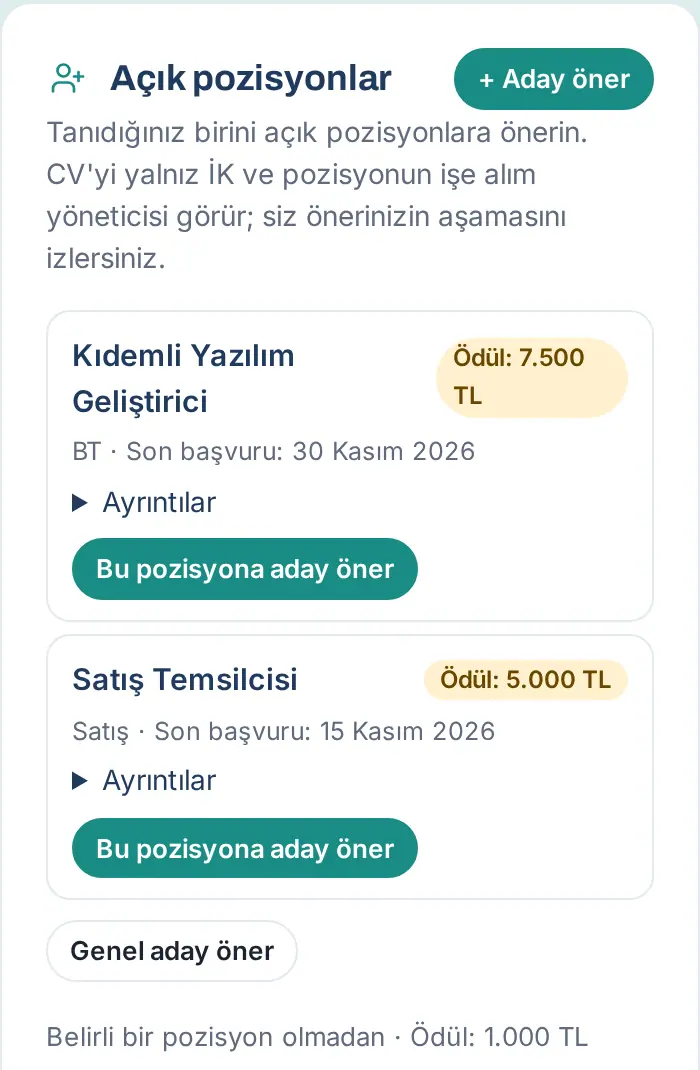
Tip: You can also go to Open positions · Refer a candidate by typing "aday" ("candidate"), "referans" ("referral"), "pozisyon" ("position") or "CV" in the Board search.
Important: If there are no open positions, it says "There are no open positions right now."; if general referrals are on, it continues with "Uygun birini tanıyorsanız genel aday olarak önerebilirsiniz." ("if you know someone suitable, you can refer them as a general candidate."). A position whose application deadline has passed is removed from the list.
Referring a candidate from the Today screen
Who: Employee · Where: My Space → Today → Open positions · Refer a candidate
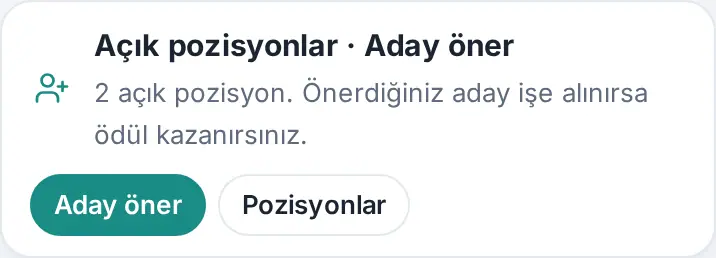
What it does: From the short entry line at the top of the Today screen, you open the candidate referral window directly. Below the line, the number of open positions is written (e.g. "2 open positions. If your candidate is hired, you earn a bonus.").
- On the Today screen, find the Open positions · Refer a candidate line.
- To make a referral right away, click Refer a candidate; the Referring a candidate window opens.
- To look at the positions, click Positions; you go to the Open positions box in Services.
For the other entry lines on the Today screen, see 06. Board and intranet.
Referring a candidate
Who: Employee · Where: Open positions → Refer a candidate for this position (or + Refer a candidate, General referral)
What it does: You send the candidate's details and CV to HR securely. The CV does not go to Team Square or to the announcements.
Before you start: Tell the candidate that you will share their details and CV with the company's Human Resources, and get their consent. The CV file must be PDF, DOC or DOCX and can be at most 5 MB.
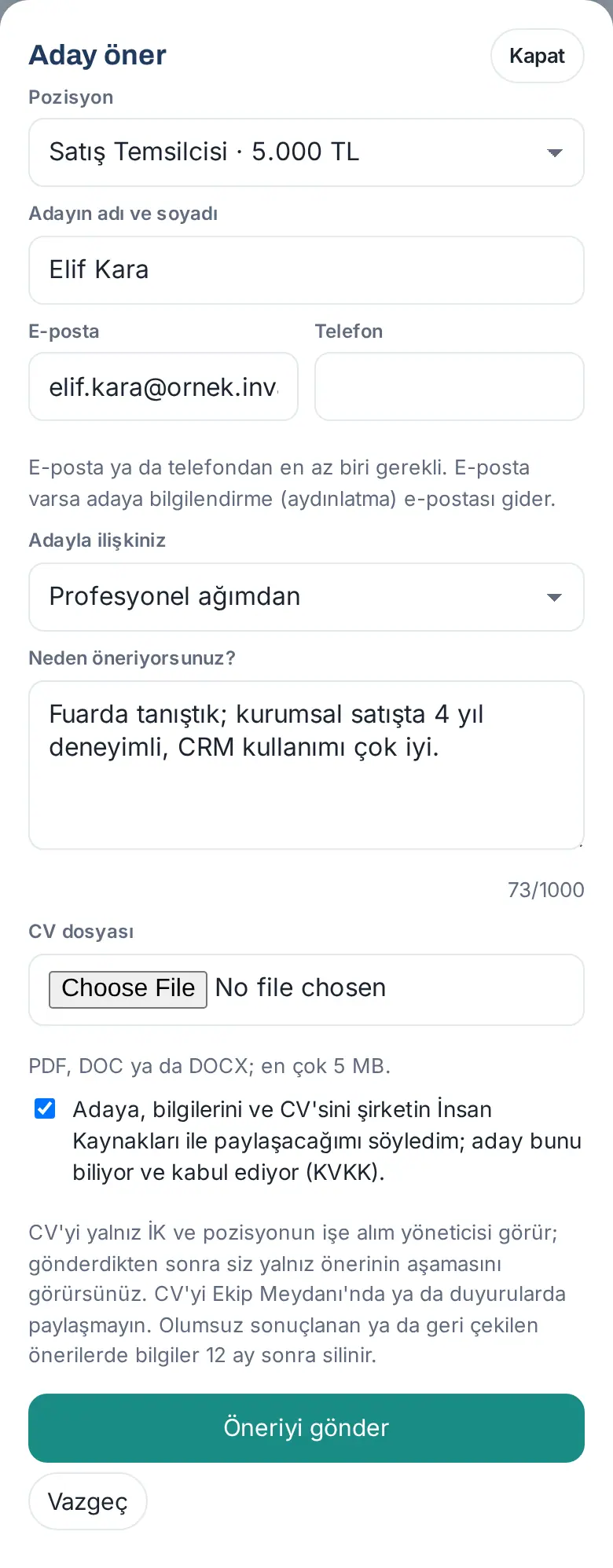
- Click Refer a candidate for this position below the position. The Refer a candidate window opens.
- The Position list shows the position you selected and its bonus (e.g. "Satış Temsilcisi · 5.000 TL" — "Sales Representative · 5.000 TL"). If it is not for a specific position, select General referral (no specific position) (if your company allows it).
- Fill in the Candidate's full name box.
- Fill in at least one of the Email or Phone boxes. If there is an email, a notice (privacy notice) email goes to the candidate.
- In the Your relationship to the candidate list, select one: Former colleague, Schoolmate, Acquaintance / friend, Relative, From my professional network or Other.
- In the Why do you refer them? box, write a few sentences (at least 10, at most 1000 characters).
- Select the CV file.
- Check the I told the candidate I would share their details and CV with the company's HR; the candidate knows and agrees (data protection). box.
- Click Send referral.
Result: The message "Your referral was sent to HR. The candidate received a privacy notice email." appears (if you did not enter an email, or if the company turned off the privacy notice email, only the first sentence). HR gets the notification "New candidate referral". Your referral is added to the My referrals list with the New stage.
Tip: At the bottom of the window, it says who will see it: "Only HR and the position's hiring manager can see the CV; after you send it, you only see the stage of the referral." If your connection drops, it says "No connection; your details are still in the form. Send again when you're back online."; click Send referral again without closing the form.
Common errors:
- "Enter the candidate's full name." / "Enter the candidate's email or phone."
- "Check the email address." / "Check the phone number."
- "Select your relationship to the candidate."
- "Write a few sentences on why you refer them (at least 10 characters)."
- "Choose the CV file." / "The CV must be PDF, DOC or DOCX." / "The CV can be at most 5 MB (selected: …)." / "The CV file is empty."
- "Confirm that the candidate knows and agrees (data protection)."
- "This email belongs to one of our employees; employees cannot be referred as candidates."
- "This position no longer accepts referrals.": the position closed in the meantime or its deadline passed.
- "Today's referral limit has been reached.": at most 20 referrals can be sent in a day.
Important: After you send it, you cannot open the CV again or edit the referral. If you sent wrong details, write to HR. Do not share the CV in Team Square or in announcements.
If the same candidate was referred before
Who: Employee · Where: Refer a candidate window
What it does: If another referral was made before with the same email or phone, you are warned before you send it. If the candidate is hired, the bonus goes to the first referrer.
- When you click Send referral, the This candidate was already referred question appears: "This candidate was referred on 16 October 2026. First-referrer rule: if the candidate is hired, the bonus goes to the first referrer. Send anyway?"
- To send the referral anyway, click Submit anyway; to give up, click Go back.
Result: The referral goes to HR with the Duplicate mark. If the candidate is hired, My referrals says "Bonus: the candidate was referred earlier by another employee, so it goes to the first referrer."
Common errors: "Bu adayı bu pozisyon için zaten önerdiniz (…)." ("you already referred this candidate for this position (…)"; for a general referral "… bu genel öneri için …" — "… for this general referral …"): you already referred the same candidate for the same position and the referral is still open; it is not sent a second time.
My referrals: following the stages
Who: Employee · Where: My Space → Services → Open positions → My referrals
What it does: You see which stage the candidates you referred are at and the status of the bonus.
- Go to the My referrals list below the Open positions box. Each referral shows the stage badge, the referral number and date (e.g. "A-238583 · 16 Oct 2026"), the candidate's name and the position (or General referral).
- The stages, in order, are:
- New: the referral reached HR.
- Under review: HR is reviewing the CV.
- Interview: an interview is being held with the candidate.
- Offer: a job offer was made to the candidate.
- Hired: the candidate was hired; the bonus line shows.
- Rejected: a negative decision was made for the candidate. If HR wants, it also shows you the reason ("Reason: …").
- Candidate withdrew: the candidate withdrew their application; their details were deleted.
- Each time the stage changes, a notification such as "Your referral: Interview" comes to your phone.
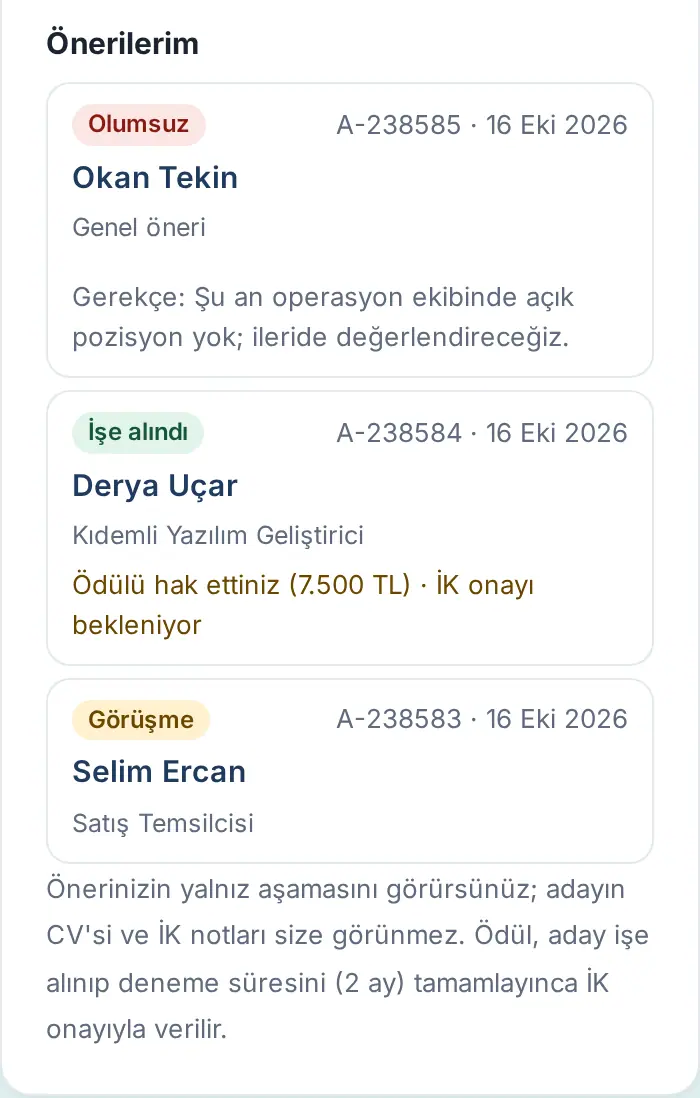
Tip: If you have not made a referral yet, it says "You haven't referred anyone yet." Below the list, it also reminds you: "You see only the stage of your referral; the candidate's CV and HR notes are not visible to you." In Reports → Refer a candidate, you see the numbers of candidates you referred, of those hired and of bonuses paid.
Important: For referrals whose details were deleted, "Candidate details deleted" shows instead of the candidate's name; the stage and the date stay.
Referral bonus and the probation period
Who: Employee · Where: My referrals → bonus line
What it does: If the candidate you referred is hired, you follow which stage the bonus is at. The bonus is given with HR approval once the candidate starts work and completes the probation period (company setting; default 2 months).
The bonus line changes in this order:
- The candidate is Hired: the notification "Your referred candidate was hired" comes; the line says "Bonus: 5.000 TL · probation ends …".
- When the probation period ends: the notification "You’ve earned a referral bonus" comes; the line says "You earned the bonus (5.000 TL) · awaiting HR approval".
- When HR approves the payment: the notification "Your referral bonus was approved" comes; the line says "Bonus approved: 5.000 TL". The amount is passed to payroll; if your company gives the bonus as points, the points are added to your suggestion-reward points.
- If the candidate leaves during the probation period: the notification "Referral bonus cancelled" comes; the line says "Bonus cancelled: the employee left during probation".
Tip: The bonus is the bonus of the position at the moment the candidate is hired, not at the moment you made the referral. If the position has no bonus, the bonus line does not show.
Important: If several employees referred the same candidate, the bonus goes to the first referrer. If you are the first referrer and the candidate was hired through someone else's referral, it shows in your referral list with the note " · you referred first" and the bonus is written to you.
The notice sent to the candidate and withdrawal
Who: Employee (information about the candidate) · Where: The candidate's email
What it does: The candidate learns how their personal data will be processed and, if they want, withdraws their candidacy. This section is for you to know what goes to the candidate.
- If you entered an email and the company setting is on, an email with the subject "Adaylığınız ve kişisel verileriniz hakkında · <şirket>" ("about your candidacy and your personal data · <company>") goes to the candidate. The email states your name, the position, the data controller, the data processed, the purpose, the legal basis, who will see it, the retention period and the rights under KVKK Art. 11.
- At the end of the email there is the link Başvurumu geri çek ve verilerimi sil (giriş gerekmez) ("withdraw my application and delete my data (no sign-in needed)"). If the candidate opens the link and clicks Withdraw my application and delete my data, their candidacy ends; their name, contact details and CV are deleted immediately.
- If the candidate withdraws, you get the notification "Your referral: Candidate withdrew"; the stage of your referral becomes Candidate withdrew.
Important: A candidate who was hired cannot withdraw with this link; the page says "Hiring is complete, so the application cannot be withdrawn here; please contact Human Resources." If the candidate has no email, inform the candidate yourself.
How long candidate details are kept
Who: Employee · Where: —
What it does: You know when the details of the candidate you referred are deleted.
- For referrals that ended as Rejected or Candidate withdrew, the candidate's name, contact details, the referral description, the notes and the CV are deleted automatically once the company's retention period (default 12 months) after the referral closed runs out. The numbers and the stage history stay.
- If the candidate uses the withdrawal link, the details are deleted immediately.
- HR can delete the details at any time upon a KVKK request.
- The details of a hired candidate are not deleted after this period; the employee record and the onboarding process continue in HR.
For deleted referrals, My referrals shows "Candidate details deleted".